
Key facts
- Brand
- HP
- Model
- PL5060N
- Category
- Television
- Documents
- 2
- Languages
- EN
- Last added
- 2012-06-04
Start here
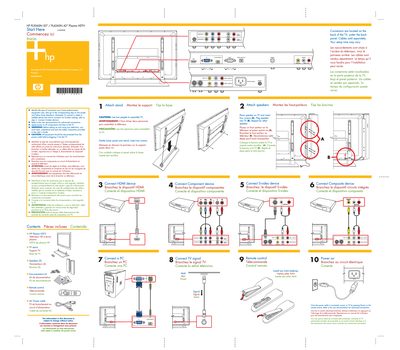
HP PL5060N / PL4260N Plasma HDTV Quick Start Guide
This guide provides a brief, step‑by‑step overview for setting up HP PL5060N (50") and PL4260N (42") plasma HDTVs. It explains how to identify connector types, attach speakers, and power the TV safely.\n\nThe document also lists the items included with the TV (remote control, stand, speakers, AC power cable) and highlights safety warnings such as disconnecting power before assembly and using two people to install the TV.
Read onlineHP PL5060N specifications
| Screen Size | 50-Inch (127-Centimeter) |
|---|---|
| Product Type | Plasma High-Definition Television |
| Copyright Year | 2006 |
All HP PL5060N documents by type
The shortest path to a working setup, usually only a few pages.
Day-to-day operation, settings and troubleshooting. Start here if the product is already set up.
Questions answered in these manuals
How many people should assemble the TV?
Two people are recommended to assemble the TV.
What type of batteries does the remote control use?
The remote control uses two AAA batteries.
What should I do to reduce the risk of fire or electrical shock?
Do not expose this appliance to rain or moisture.
Can I service the television myself?
No, servicing should be referred to qualified service personnel.