
Key facts
Start here
HP Color LaserJet 3700 Series Parallel Configuration Guide
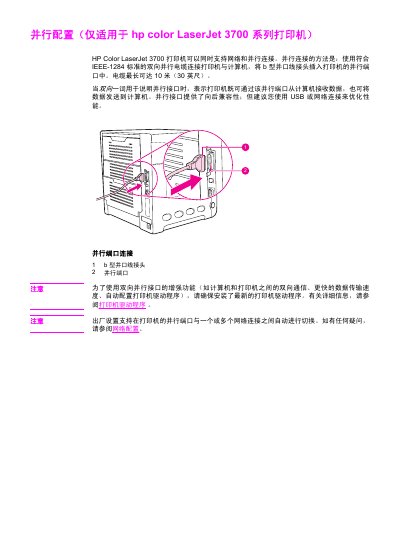
The document provides instructions for connecting the HP Color LaserJet 3700 series printer to a computer via a parallel interface. It specifies that this connection method uses a bidirectional cable conforming to the IEEE-1284 standard, with a maximum length of 10 meters (30 feet). The guide details how to insert the Type B parallel cable connector into the printer's parallel port. This manual is written in Chinese.
Read onlineAll HP Color LaserJet 3700 Series documents by type
Day-to-day operation, settings and troubleshooting. Start here if the product is already set up.
Questions answered in these manuals
What is the maximum length of the parallel cable for this printer?
The cable can be up to 10 meters (30 feet) long.
From: HP Color LaserJet 3700 Series Parallel Configuration Guide
What type of connector is used for the parallel port connection?
You must use a bidirectional parallel cable with a B-type parallel port connector.
From: HP Color LaserJet 3700 Series Parallel Configuration Guide
What is the part number for a 4 MB flash DIMM memory upgrade?
The part number for a 4 MB flash DIMM memory upgrade is C4287A.
From: HP Color LaserJet 3700 Series Supplies and Accessories Ordering Guide
Which part numbers are used for the cyan, yellow, and magenta toner cartridges in the HP Color LaserJet 3700 Series?
The part numbers are Q2681A for cyan, Q2682A for yellow, and Q2683A for magenta.
From: HP Color LaserJet 3700 Series Supplies and Accessories Ordering Guide