
Key facts
Start here
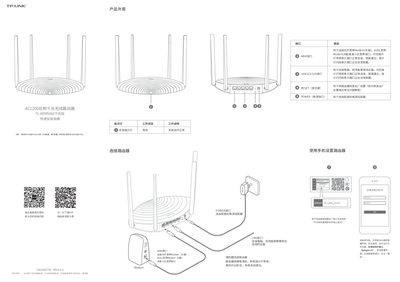
TP-LINK TL-WDR5660 AC1200 Dual-Band Gigabit Router Quick Installation Guide
This document provides a quick start guide for the TP-LINK TL-WDR5660 AC1200 Dual-Band Gigabit Router. It details the product appearance, including port functions such as WAN, LAN, and POWER interfaces, along with LED status indicators.
The guide instructs users on how to connect the router physically and configure it via a web browser using the default address 'tplogin.cn'. It covers setting up internet access (PPPoE), configuring wireless networks, and includes troubleshooting steps for common issues like inability to access the management interface or lack of internet connectivity. This manual is written in Chinese.
TP-LINK C1200 specifications
| Ethernet ports | 2 RJ‑45 ports |
|---|---|
| LED status indicators | Yellow pulse/reset, Yellow solid/startup, Blue pulse/ready, Blue solid/setting up, White solid/registered, Red solid/disconnected |
| 5 GHz antenna gain | 1 dBi internal antenna |
| 2.4 GHz antenna gain | 1.5 dBi internal antenna |
| Power connection | Connects to provided power adapter |
Source: TP-Link Deco M4/M4R/E4/E4R/W2400 AC1200 Whole Home Mesh Wi‑Fi System User Guide
All TP-LINK C1200 documents by type
Day-to-day operation, settings and troubleshooting. Start here if the product is already set up.
The shortest path to a working setup, usually only a few pages.
Mounting, wiring and first power-up. Read it before the hardware goes in.
Questions answered in these manuals
How do I reset the router to factory settings?
Press and hold the 'RESET' button on the back panel until the system indicator light flashes, then release.
From: TP-LINK TL-WDR5660 AC1200 Dual-Band Gigabit Router Quick Installation Guide
What is the default management address for this router?
You can log in to the management interface by entering 'tplogin.cn' in your browser's address bar.
From: TP-LINK TL-WDR5660 AC1200 Dual-Band Gigabit Router Quick Installation Guide
How can I change the Wi‑Fi network name and password?
Open the Wi‑Fi Settings in the Deco app, where you can edit the network name (SSID) and password for the main network or create a separate guest network.
From: TP-Link Deco M4/M4R/E4/E4R/W2400 AC1200 Whole Home Mesh Wi‑Fi System User Guide
What address do I enter to access the router setup page?
Open a web browser and type http://192.168.0.1 in the address bar.
What are the default login credentials?
The username is admin and the password is TIME, using the last 4 characters of the MAC address.
How can the EAP225 be powered?
It can be powered via a PSE device such as a PoE switch or a power adapter.
From: TP-Link EAP225 AC1200 Wireless Dual Band Gigabit Access Point Quick Installation Guide