
Key facts
Start here
TP-Link AC750 Wireless Dual Band Gigabit Router Quick Installation Guide
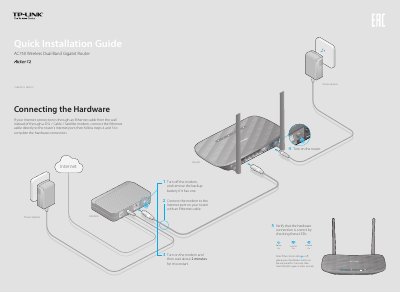
This document serves as a Quick Installation Guide for the TP-Link AC750 Wireless Dual Band Gigabit Router. It provides step-by-step instructions for connecting the hardware, including the modem and power adapter, and verifying the status of the router's LEDs. The guide also details how to power on the device and check the wireless indicators.
Read onlineTP-Link AC750 specifications
| Wi-Fi Standard | 802.11ac |
|---|---|
| Wireless Speeds | 300Mbps on 2.4GHz, 450Mbps on 5GHz |
| USB Functionality | Storage Sharing, Print Server, FTP Server, Media Server |
| WAN Port Type | Interchangeable LAN/WAN Port |
| IPv6 Support | Yes |
Source: TP-LINK Archer D20 AC750 Wireless Dual Band ADSL2+ Modem Router User Guide
All TP-Link AC750 documents by type
Day-to-day operation, settings and troubleshooting. Start here if the product is already set up.
The shortest path to a working setup, usually only a few pages.
Questions answered in these manuals
What is the wireless speed of the Archer D20?
It offers 300Mbps on the 2.4GHz band and 450Mbps on the 5GHz band, totaling 750Mbps concurrent dual-band speed.
From: TP-LINK Archer D20 AC750 Wireless Dual Band ADSL2+ Modem Router User Guide
Can I use the USB port for sharing files and printers?
Yes, the USB port supports storage sharing, print server, FTP server, and media server functions.
From: TP-LINK Archer D20 AC750 Wireless Dual Band ADSL2+ Modem Router User Guide
What can I do if the login window does not appear?
Change the computer setting to obtain an IP address automatically, verify the URL http://tplinkwifi.net, try another browser, reboot the router, or disable and re-enable the network adapter.
From: TP-Link AC750 Wireless Dual Band Gigabit Router Quick Installation Guide
How do I restore the router to its factory default settings?
Press and hold the WPS/Reset button on the back until the Power LED starts blinking, or log in to the Web Management page and select System Tools > Factory Defaults.
From: TP-Link AC750 Wireless Dual Band Gigabit Router Quick Installation Guide