
This quick installation guide covers the setup, connection, and wireless configuration for the TP-LINK TL-WDR5660 router.
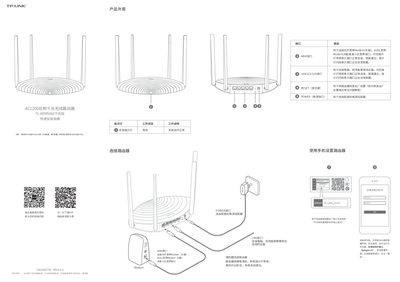
This document provides a quick start guide for the TP-LINK TL-WDR5660 AC1200 Dual-Band Gigabit Router. It details the product appearance, including port functions such as WAN, LAN, and POWER interfaces, along with LED status indicators.
The guide instructs users on how to connect the router physically and configure it via a web browser using the default address 'tplogin.cn'. It covers setting up internet access (PPPoE), configuring wireless networks, and includes troubleshooting steps for common issues like inability to access the management interface or lack of internet connectivity. This manual is written in Chinese.
Press and hold the 'RESET' button on the back panel until the system indicator light flashes, then release.
You can log in to the management interface by entering 'tplogin.cn' in your browser's address bar.
Ensure the wireless function is on, check that the SSID and password are correct (case-sensitive), or try resetting the router.