
Key facts
Start here
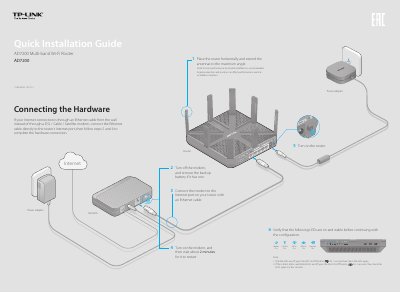
TP-LINK AD7200 Multi-band Wi-Fi Router Quick Installation Guide
This document serves as a Quick Installation Guide for the TP-LINK AD7200 Multi-band Wi-Fi Router. It details the hardware setup process, including connecting the modem and power adapter, and verifying LED status indicators for the 2.4GHz, 5GHz, and 60GHz bands.
Read onlineTP-LINK AD7200 specifications
| Total Wi-Fi Speed | up to 7200Mbps |
|---|---|
| 2.4GHz Band Speed | 800Mbps |
| 5GHz Band Speed | 1733Mbps |
| 60GHz Band Speed | 4620Mbps |
| Antennas | 8 external antennas |
| USB Port | USB 3.0 |
| Encryption | WPA/WPA2, WPA-PSK/WPA2-PSK |
| Internet Access Types | Dynamic IP/Static IP/PPPoE/PPTP/L2TP |
All TP-LINK AD7200 documents by type
Day-to-day operation, settings and troubleshooting. Start here if the product is already set up.
The shortest path to a working setup, usually only a few pages.
Questions answered in these manuals
What is the maximum combined Wi-Fi speed of the AD7200?
The AD7200 offers a fastest combined Wi-Fi speed of up to 7200Mbps.
Can I use the router with older Wi-Fi standards?
Yes, the AD7200 is backward compatible with 802.11n and 802.11ac.
What can I do if the login page does not appear?
Change the computer setting to obtain an IP address automatically, verify the URL, try another browser, reboot the router, or disable and re-enable the network adapter.
From: TP-LINK AD7200 Multi-band Wi-Fi Router Quick Installation Guide
How do I restore the router to its factory default settings?
Press and hold the Reset button on the back for about 10 seconds until all LEDs go on, then release the button.
From: TP-LINK AD7200 Multi-band Wi-Fi Router Quick Installation Guide