
Key facts
- Brand
- TP-Link
- Model
- RE300
- Category
- Wireless connection
- Documents
- 2
- Languages
- EN
- Last added
- 2023-11-01
Start here
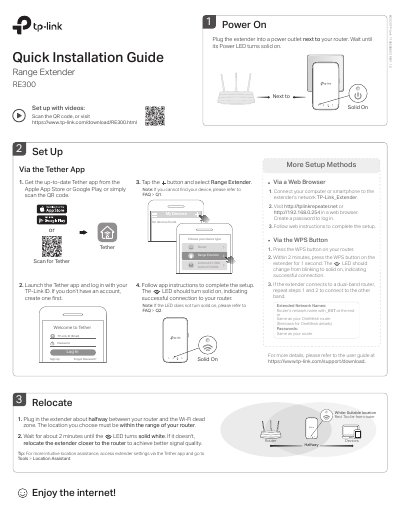
TP-Link RE300 Range Extender Quick Installation Guide
This quick installation guide covers setup of the TP-Link RE300 range extender. It describes powering on, choosing a location, and connecting via WPS, web browser, or the Tether app.
It also explains accessing extender settings, LED status meanings, OneMesh features, safety information, and troubleshooting for common setup issues.
All TP-Link RE300 documents by type
The shortest path to a working setup, usually only a few pages.
Day-to-day operation, settings and troubleshooting. Start here if the product is already set up.
Questions answered in these manuals
What should I do if the Tether app cannot find my device?
Connect your smartphone to the extender’s network TP-Link_Extender, launch the Tether app, select your extender, and follow the app instructions.
What should I do if the LED doesn’t turn solid on after setup?
You may have entered an incorrect Wi-Fi password for your host router; check the password and try again, and make sure the extender is close to the router.
How do I connect the extender using WPS?
Press the WPS button on your host router, and then press the WPS button on the extender within 2 minutes.
From: TP-LINK TL-WA860RE 300Mbps Wi-Fi Range Extender User Guide
How do I reset the extender to factory settings?
Press and hold the RESET button until all the LEDs turn on momentarily.
From: TP-LINK TL-WA860RE 300Mbps Wi-Fi Range Extender User Guide