
TP-LINK AD7200 Multi-band Wi-Fi Router Quick Installation Guide

This guide provides quick installation instructions, hardware connection steps, and configuration procedures for the TP-LINK AD7200 Multi-band Wi-Fi Router.
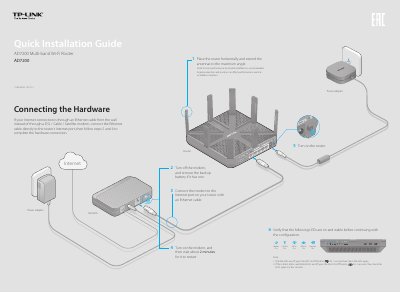

TP-LINK AD7200 Multi-band Wi-Fi Router Quick Installation Guide - cover page
Brand
TP-Link
Category
Router
Document type
Quick Start Guide
Language
English
Pages
2
File format
PDF
File size
1018 KB
Published
01 November, 2026
Updated
01 November, 2026
MD5 checksum
1E6997BDDF3E20C7D8A094A8145EE8F3

About this manual

This document serves as a Quick Installation Guide for the TP-LINK AD7200 Multi-band Wi-Fi Router. It details the hardware setup process, including connecting the modem and power adapter, and verifying LED status indicators for the 2.4GHz, 5GHz, and 60GHz bands.

What's inside

  • Connecting the Hardware
  • Configuring the Router
  • Internet Connection Type
  • Wireless Settings
  • FAQ
  • USB Features
  • Remote Access via FTP Server
  • Media Sharing
  • Printer Sharing
  • WPS Connection

Specifications

USB PortUSB 3.0 Port

Frequently asked questions

What can I do if the login page does not appear?

Change the computer setting to obtain an IP address automatically, verify the URL, try another browser, reboot the router, or disable and re-enable the network adapter.

How do I restore the router to its factory default settings?

Press and hold the Reset button on the back for about 10 seconds until all LEDs go on, then release the button.

What can I do if I forgot my wireless network password?

Check the product label for the factory default password or log into the Web Management page to obtain or reset it.

Download PDF (1018 KB)

More TP-Link Manuals


View all TP-Link manuals →