
Key facts
- Brand
- Siemens
- Model
- S400
- Documents
- 4
- Languages
- ZH
- Last added
- 2011-12-09
Start here
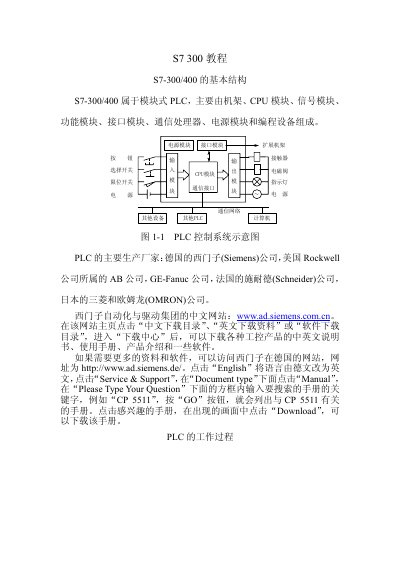
Siemens S7-300/400 PLC Tutorial Manual
The manual introduces the modular architecture of the S7‑300/400 PLC family, describing the rack, CPU, power, signal, function and communication modules. It also lists the major PLC manufacturers and provides links to Siemens' download portals.
Further sections detail the scan cycle, input/output image registers, wiring diagrams, LED status indicators, CPU classifications, module diagnostics, and PID controller tuning methods, giving a comprehensive overview for users and technicians. This manual is written in Chinese.
Siemens S400 specifications
| CPU RAM | 512 KB |
|---|---|
| Memory bits | 8192 |
| Timers | 512 |
| Counters | 512 |
| Digital I/O points | 65536 |
| Analog channels | 4096 |
| Instruction count | ≈350 |
| Counter range | 1‑999 |
| Timer range | 10 ms‑9990 s |
All Siemens S400 documents by type
Day-to-day operation, settings and troubleshooting. Start here if the product is already set up.
Instruction set, parameters and examples for configuring or programming the device.
Questions answered in these manuals
What does the LED SF indicate?
The red SF LED lights when the CPU has a hardware fault or software error.
What does the RUN LED indicate?
The RUN LED (green) lights when the CPU is in RUN state.
What is the scan cycle time?
It is the time the operating system needs to complete one scan cycle as shown in the diagram.
What safety symbols are used in the manual?
The manual uses the symbols Danger, Warning, Caution and Notice to indicate the level of hazard.
Who is allowed to install and operate the equipment?
Only qualified personnel are permitted to install and operate the equipment.
What does SFC20 BLKMOV do?
It copies a storage area.
From: Siemens S7-300/400 System Software Standard Functions Manual