
Key facts
- Brand
- NEC
- Model
- NP610
- Industry
- Electronics
- Documents
- 4
- Languages
- JA · PT · SV · EN
- Last added
- 2012-05-10
Start here
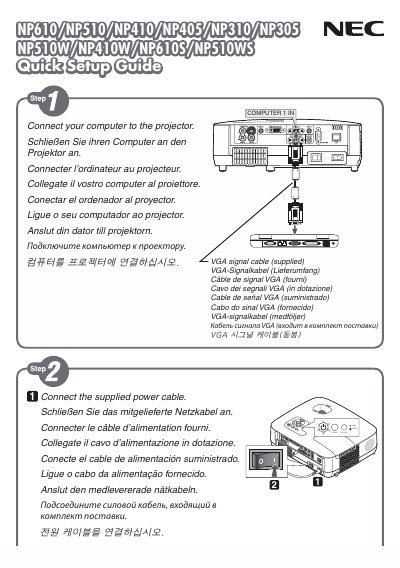
NEC NP610/NP510/NP410/NP405/NP310/NP305/NP610S/NP510WS Quick Setup Guide
The Quick Setup Guide walks you through the essential steps to connect the projector to a computer, select the appropriate input source, and adjust basic picture settings. It includes instructions for using the AUTO ADJ button to automatically optimize the displayed image.
Additional menu options such as KEYSTONE, WALL COLOR, and ECOMODE are described, allowing you to fine‑tune the projector's performance and customize features like closed captioning and power settings. This manual is written in Japanese.
NEC NP610 specifications
| Input voltage (standard models) | 100‑240 V AC, 50/60 Hz |
|---|---|
| Input voltage (G models) | 200‑240 V AC, 50/60 Hz |
| Lamp type | High‑pressure mercury lamp |
All NEC NP610 documents by type
Day-to-day operation, settings and troubleshooting. Start here if the product is already set up.
The shortest path to a working setup, usually only a few pages.
Questions answered in these manuals
How do I enable automatic image adjustment?
Press the AUTO ADJ button to optimize the computer image automatically.
From: NEC NP610/NP510/NP410/NP405/NP310/NP305/NP610S/NP510WS Quick Setup Guide
What should I do if I use the projector at high altitude?
Set the fan mode to “HIGH ALTITUDE” when operating above roughly 1600 m (5500 ft); otherwise the projector may overheat or the lamp may cool too quickly.