
This is a manual for using NEC Viewtechnology, Ltd. 2005 Ver. 1. 09/05 model projector. The projector supports VGA signal, connects the power supply, turns on the power and selects the signal source, and then connects the computer to the projector for projection.
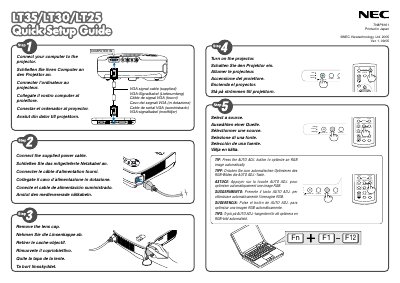
This guide provides the essential steps to install and configure the NEC LT35 projector, including connecting video sources, adjusting auto‑keystone, and powering the unit. It is intended for users who need to get the projector up and running quickly.
The document covers VGA connection, power‑cable removal, and the use of automatic focus and keystone correction features, with brief instructions for each operation.
| Video Input | VGA |
|---|
Unplug the power cable.
Connect the VGA cable to the VGA input.
Use the Auto Keystone Correction (Vertical) feature.