
Key facts
- Brand
- NEC
- Model
- MT1045
- Industry
- Electronics
- Documents
- 12
- Languages
- EN · SV · IT · DE
- Last added
- 2012-08-02
Start here
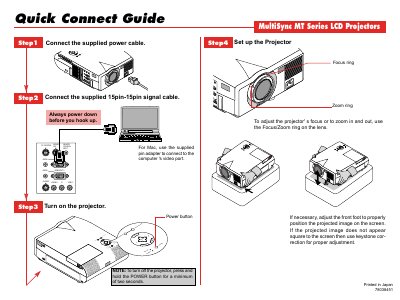
NEC mt1045_qg_e
The Connect Guide provides step‑by‑step instructions for powering up the projector, attaching the 15‑pin signal cable, and adjusting focus and zoom using the lens rings. It also explains how to set up the remote mouse, including the supplied serial cable and adapter for PC or Mac.
Additional details cover remote control functions such as source selection, auto‑adjust, menu navigation, mouse‑pad operation, laser pointer activation, and picture mute. The guide notes safety reminders like powering down both projector and computer before connecting cables.
NEC MT1045 specifications
| Lamp Life (MT1045) | 1500 hours |
|---|---|
| Lamp Life (MT840/MT1040) | 2000 hours |
| Power Supply | 100-120 or 200-240 V 50/60 Hz AC |
| Laser Class | Class II |
Source: NEC MultiSync MT840/MT1040/MT1045 LCD Projector User's Manual
All NEC MT1045 documents by type
Day-to-day operation, settings and troubleshooting. Start here if the product is already set up.
- projector MultiSync MT840E/MT1040E/MT1045E LCD Projector User Manual 44 p
- NEC MultiSync MT840/MT1040/MT1045 LCD Projector User's Manual 44 p
- NEC MultiSync MT840/MT1040/MT1045 LCD Projector User's Manual 44 p
- NEC MultiSync MT840/MT1040/MT1045 LCD Projector User's Manual 44 p
- MultiSync MT840/MT4040/MT1045 LCD Projector user manual(1) 42 p
- MultiSync MT840/MT4040/MT1045 LCD Projector user manual(1)(1) 42 p
- NEC MultiSync MT840/MT1040/MT1045 User Manual 42 p
- NEC MultiSync MT840/MT1040/MT1045 Projector User Manual 42 p
- NEC MultiSync MT840/MT1040/MT1045 User Manual 42 p
- NEC MT1045 Remote Control User Manual 59 p
- NEC MultiSync MT840/MT1040/MT1045 LCD Projector User Manual 42 p
The shortest path to a working setup, usually only a few pages.
- NEC mt1045_qg_e 2 p
Questions answered in these manuals
What is the maximum recommended usage time for the lamp before it may shatter?
You should replace the lamp when the Status light comes on, as continuing to use it after 2000 hours (or 1500 hours for the MT1045 model) may cause the bulb to shatter.
From: projector MultiSync MT840E/MT1040E/MT1045E LCD Projector User Manual
How much space must be left between the projector and a wall for ventilation?
To prevent heat buildup, you must allow at least 3 inches (10cm) of space between the projector and a wall.
From: projector MultiSync MT840E/MT1040E/MT1045E LCD Projector User Manual
How many hours can the lamp be used before it might shatter?
The lamp bulb may shatter if used for more than 2000 hours, or 1500 hours for the MT1045 model.
From: NEC MultiSync MT840/MT1040/MT1045 LCD Projector User's Manual
What is the minimum space required between the projector and a wall?
You must allow at least 3 inches (10cm) of space between the projector and a wall.
From: NEC MultiSync MT840/MT1040/MT1045 LCD Projector User's Manual
What is the maximum operating time for the lamp before it may shatter?
The lamp bulb may shatter if used for more than 2000 hours, or 1500 hours for the MT1045 model.
From: NEC MultiSync MT840/MT1040/MT1045 LCD Projector User's Manual
How much space must be left between the projector and a wall for ventilation?
You must allow at least 3 inches of space between the projector and a wall.
From: NEC MultiSync MT840/MT1040/MT1045 LCD Projector User's Manual