
Key facts
Start here
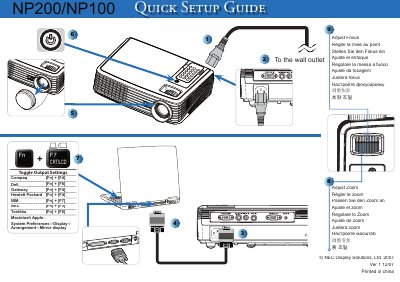
NEC NP200 Quick Setup Guide
This guide provides the essential steps to get the NEC NP200 display up and running. It includes keyboard shortcuts for adjusting focus and zoom, as well as instructions for mirroring the display on a Macintosh system.
The document also lists the copyright information and version details, indicating it was printed in China in December 2007.
All NEC NP200 documents by type
Day-to-day operation, settings and troubleshooting. Start here if the product is already set up.
The shortest path to a working setup, usually only a few pages.
Disassembly, diagnostics and part numbers, for repair.
Questions answered in these manuals
How do I adjust the zoom on the NEC NP200?
Use the display's zoom function as described in the "Adjust Zoom" section.
How much does a loan unit cost and for how long can it be used?
The loan unit costs US$200 and can be used for up to 12 calendar days.
From: NEC NP200/NP100 Service Manual – TravelCare Service Program
What service options are available for NEC NP200/NP100 projectors?
There are three service options: Repair and Return, Repair and Return with Loan, and Loan Only.
What are the warranty exclusions for these projectors?
Warranty does not cover accidents, transportation, neglect, misuse, abuse, water damage, and similar causes.
How do I replace the projector lamp?
Cool the unit, then follow the instructions on pages 33‑34 to remove the old lamp and install a new one, making sure the lamp‑life warning is observed.
What safety steps must be taken before servicing the projector?
Disconnect the power cable and all other cables, avoid opening the case, and let qualified service personnel handle any internal work.