
Key facts
- Brand
- TP-Link
- Model
- TL-CT520
- Category
- Other Electronics
- Industry
- Electronics
- Documents
- 2
- Languages
- ZH
- Last added
- 2026-11-11
Start here
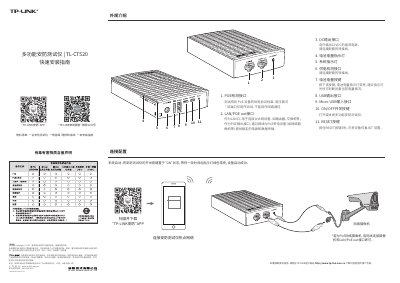
TP-LINK TL-CT520 Multifunction Security Tester Quick Installation Guide
TP-LINK TL-CT520 is a multifunction security tester. This quick installation guide covers its appearance and connection configuration, system startup, adding the device through the TP-LINK Security app, power detection, warranty terms, and package contents.
The guide labels 11 device interfaces and controls, including PoE detection, LAN/PoE out, DC output, battery indicator, system indicator, power detection, battery button, USB output, Micro USB input, power switch, and RESET. It also describes app screens for adding cameras and checking 12 V, DC, and PoE power readings. This manual is written in Chinese.
All TP-LINK TL-CT520 documents by type
The shortest path to a working setup, usually only a few pages.
Questions answered in these manuals
How do I start the device?
Set the power switch to ON and wait until the indicator light stays green.
From: TP-LINK TL-CT520 Multifunction Security Tester Quick Installation Guide
How do I restore factory settings?
Hold the RESET button for 3 seconds.
From: TP-LINK TL-CT520 Multifunction Security Tester Quick Installation Guide
How do I start the TL-CT520 security tester?
Set the ON/OFF switch to the ON position and wait until the system indicator turns solid green, which means the device has started successfully.
From: TP-LINK TL-CT520 Multi-function Security Tester Quick Installation Guide
How do I restore the tester to factory settings?
Press and hold the RESET button for 3 seconds and then release it; the SYS indicator goes off and lights up again when the reset is complete.
From: TP-LINK TL-CT520 Multi-function Security Tester Quick Installation Guide