
Installation Guide for Multi-function Security Tester
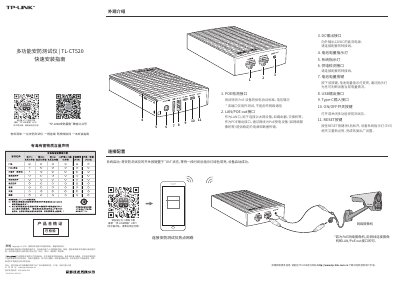
This is the Chinese quick installation guide (REV1.0.0) for the TP-LINK TL-CT520 Multi-function Security Tester. It introduces the tester's parts: a PoE detection port, a LAN/PoE out port, a DC output connector, battery level and system indicators, a battery level button, a USB output, a Type-C input, an ON/OFF switch and a RESET button. The package list names one security tester, one lanyard, two adapter cables and one installation guide.
The guide then explains startup and connection: switching the device on until the indicator stays green, joining the tester's wireless network or using auto discovery in the TP-LINK app, adding a camera, and running power supply detection for 12V output, PoE output and PoE protocol. A warranty statement and a hazardous substances declaration close the document. This manual is written in Chinese.
| DC Output | 12 VDC |
|---|---|
| Battery Replacement Period | 6 months |
Set the ON/OFF switch to the ON position and wait until the system indicator turns solid green, which means the device has started successfully.
Press and hold the RESET button for 3 seconds and then release it; the SYS indicator goes off and lights up again when the reset is complete.
No. The port is only used for testing and cannot be used for network communication.
One security tester, one lanyard, two adapter cables and one installation guide.