
Key facts
- Brand
- Philips
- Model
- K600
- Category
- Cell Phones
- Industry
- Electronics
- Documents
- 2
- Languages
- ZH
- Last added
- 2012-03-06
Start here
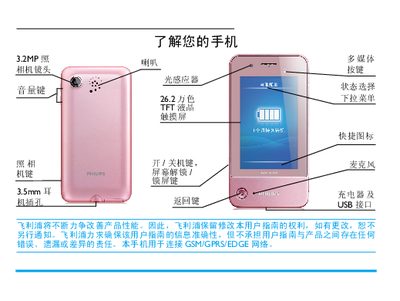
Philips K600 Phone User Manual
This manual introduces the Philips K600 phone, explaining how to power the device on and off, insert SIM and micro‑SD cards, charge the battery, and configure basic settings such as the clock and network modes. It also describes the touchscreen, handwriting pen, and dynamic sensors that adjust the display and ringtone behavior.
Detailed sections walk you through making and receiving calls, sending messages, using multimedia functions like the camera and music player, and managing contacts and calendar events. Tips for optimizing battery life and using the device safely are provided at the end of the guide. This manual is written in Chinese.
Philips K600 specifications
| Dimensions | 103 mm × 52 mm × 14 mm |
|---|---|
| Weight | 119 g (including battery) |
| Screen resolution | 240 × 400 pixels |
| Camera resolution | 3.2 MP auto‑focus |
| Standby time | Up to 1 month |
| Talk time | Up to 8.5 hours |
| Music playback | Up to 25 hours |
| Video playback | Up to 5 hours |
| Supported memory card | MicroSD (up to 8 GB) |
| Network bands | GSM 900/1800/1900 MHz, GPRS |
All Philips K600 documents by type
Day-to-day operation, settings and troubleshooting. Start here if the product is already set up.
Questions answered in these manuals
How do I turn the phone on or off?
Press and hold the power key on the left side of the phone.
How can I lock or unlock the screen?
Short press the left key to lock, or short press the left key or slide the lock bar on the standby screen to unlock.
How long does the phone stay in standby on a single charge?
The phone can remain in standby for up to one month on a full charge.
What type of memory card can be used with the K600?
It supports a MicroSD (Micro Secure Digital) memory card.