
Key facts
- Brand
- Philips
- Model
- X503
- Category
- Cell Phones
- Industry
- Electronics
- Documents
- 3
- Languages
- ZH
- Last added
- 2012-03-23
Start here
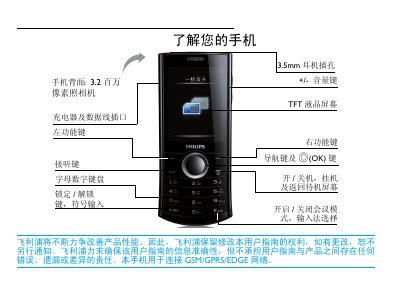
Philips X503 Mobile Phone User Manual
This manual provides step‑by‑step instructions for using the Philips X503 mobile phone, covering basic operations such as power on/off, dialing, messaging, and camera use. It also details menu navigation, shortcut keys, and safety precautions.
Additional sections describe SIM card installation, dual‑SIM management, battery optimization, Bluetooth pairing, and warranty information, helping users get the most out of their device. This manual is written in Chinese.
Philips X503 specifications
| Camera resolution | 3.2 MP |
|---|---|
| Display type | TFT LCD |
| Headphone jack | 3.5 mm |
| SIM slots | Dual SIM |
All Philips X503 documents by type
Day-to-day operation, settings and troubleshooting. Start here if the product is already set up.
Questions answered in these manuals
How do I turn the phone on or off?
Press and hold the power key (开/关机) to turn the phone on or off.
How do I insert a SIM card?
Remove the back cover, take out the battery, align the SIM card with the cut corner down, and push it into the slot; then re‑insert the battery and close the cover.
Which network frequencies does the phone operate on?
The phone works on GSM 900 MHz, 1800 MHz, and 1900 MHz bands.
How do I turn the phone on or off?
Press and hold the power key to turn the phone on or off.
How can I lock or unlock the keyboard?
Long‑press the Ps key to lock the keyboard; long‑press the Ps key again to unlock it.