
This quick start guide introduces the basic operation of Philips phone, such as turning on/off, unlocking the screen, making calls, and checking text messages.
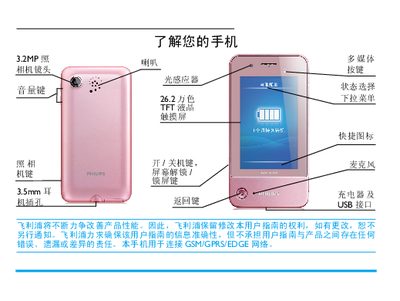
This manual introduces the Philips K600 phone, explaining how to power the device on and off, insert SIM and micro‑SD cards, charge the battery, and configure basic settings such as the clock and network modes. It also describes the touchscreen, handwriting pen, and dynamic sensors that adjust the display and ringtone behavior.
Detailed sections walk you through making and receiving calls, sending messages, using multimedia functions like the camera and music player, and managing contacts and calendar events. Tips for optimizing battery life and using the device safely are provided at the end of the guide. This manual is written in Chinese.
| Network | GSM/GPRS/EDGE |
|---|
Press and hold the power key on the left side of the phone.
Short press the left key to lock, or short press the left key or slide the lock bar on the standby screen to unlock.
When a call comes in, tap the option on the screen to answer.