
Key facts
- Brand
- Philips
- Model
- CTS4000
- Documents
- 3
- Languages
- EN · JA
- Last added
- 2012-02-28
Start here
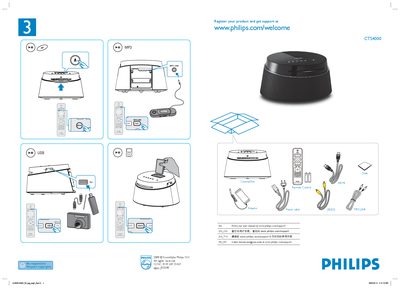
Philips CTS4000 Quick Start Guide
The guide begins with instructions to register the product and obtain support at www.philips.com/welcome. It lists the main components such as the remote control, MP3 link, USB port, and power cable, and reminds users to respect copyrights.
General setup steps are provided, including how to navigate the menu and exit it by pressing the OPTIONS button. The document also references the Philips support website for additional help.
Philips CTS4000 specifications
| Frequency response | 1860 Hz – 18 kHz |
|---|---|
| Signal‑to‑noise ratio | > 60 dB |
| Output power | 50 W |
| Power consumption | 22 W |
| Power supply | AC 100‑240 V, 50/60 Hz |
| Dimensions (W×H×D) | 273 mm × 172 mm × 273 mm |
| Weight | 2.6 kg |
All Philips CTS4000 documents by type
Day-to-day operation, settings and troubleshooting. Start here if the product is already set up.
The shortest path to a working setup, usually only a few pages.
Questions answered in these manuals
How do I register my Philips CTS4000?
Visit the registration page at www.philips.com/welcome to register your product and get support.
How can I exit the menu on the CTS4000?
Press the OPTIONS button on the remote to exit the menu.
How do I connect the CTS4000 to my TV?
Connect the HDMI cable to the HDMI output; a single HDMI cable carries both video and audio signals.
What audio formats are supported by the CTS4000?
The system supports Dolby, DTS, MPEG‑2, MP3 and other common audio formats.
How can I register my Philips CTS4000 product for support?
You can register the product at www.philips.com/welcome.
What is the warranty period for the Philips CTS4000 in Australia?
The product is covered by a 1‑year manufacturers warranty in Australia.