
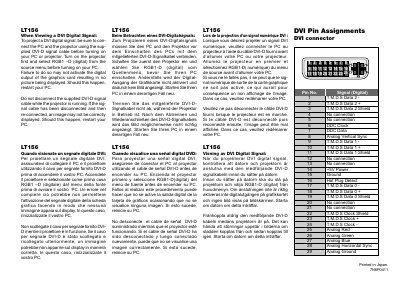
This document describes the DVI pin assignments for the LT156 connector.
This manual introduces the NEC MultiSync LT156 (also compatible with LT155 and LT154) projector, describing its features, controls, and accessories. It explains how to set up the projector safely, connect video sources, and operate the built‑in functions such as lamp control and image adjustment.
The document is organized into sections covering safety warnings, installation, daily operation, maintenance (including lamp replacement and cleaning), troubleshooting, and a full set of technical data such as voltage requirements, lamp power, USB support, and supported video resolutions.
| Input voltage | 100‑120 V or 200‑240 V, 50/60 Hz |
|---|---|
| Lamp power | 130 W NSH lamp |
| NTSC resolution | 640 × 480, 60 Hz refresh |
Connect the PC and the projector with the supplied DVI‑D cable before turning on either device, then select RGB1‑D (digital) from the source menu.
The projector is designed for 100‑120 V or 200‑240 V AC, 50/60 Hz mains power.