
Key facts
- Brand
- Brother
- Model
- FAX-410
- Category
- Fax machine
- Documents
- 6
- Languages
- EN
- Last added
- 2012-07-02
Start here
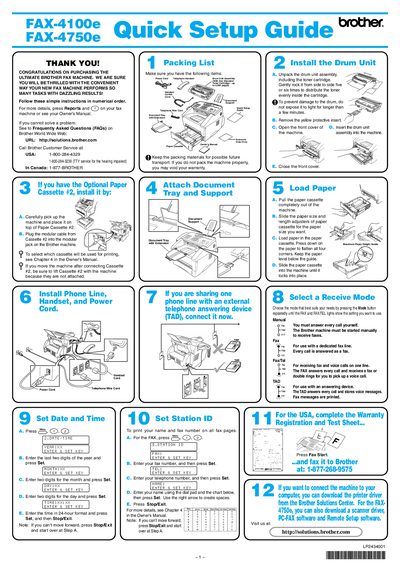
Brother FAX-4100E/4750E Quick Setup Guide
This document provides a quick setup guide for the Brother FAX-4100E/4750E fax machine. It includes instructions for unpacking the drum unit assembly, installing the machine, connecting the power and telephone cords, and loading paper into the cassette.
The guide also covers how to select the operating mode (Manual, Fax, Fax/Tel, or TAD) and how to set the date and time on the machine. Finally, it explains how to register the user's name and fax number for automatic transmission.
Brother FAX-410 specifications
| Toner capacity (TN‑430) | 3000 pages |
|---|---|
| Toner capacity (TN‑460) | 6000 pages |
| Expandable memory board (option) | 16 MB |
Source: Brother FAX-4100 / FAX-4750e / FAX-5750e User Manual
All Brother FAX-410 documents by type
The shortest path to a working setup, usually only a few pages.
Day-to-day operation, settings and troubleshooting. Start here if the product is already set up.
Questions answered in these manuals
What steps are required to prepare the drum unit assembly before inserting it into the machine?
You must gently rock the drum unit from side to side five or six times to distribute the toner evenly, and you should not expose it to light for longer than a few minutes.
How do I select which paper cassette will be used for printing?
You must consult Chapter 4 in the Owner's Manual to determine how to select the specific cassette.
Where can I register my Brother product?
You can register your product on-line at http://www.brother.com/registration/.
Who should I call for technical help in the USA?
You must call the country where you bought the machine, specifically 1-800-284-4329 for fax machines.
How many times should you rock the drum unit assembly to distribute toner?
You should gently rock the drum unit assembly from side to side five or six times.
What is the maximum page yield for the included standard toner cartridge?
The included standard toner cartridge is rated for up to 3,000 pages.