
This document is Brother printer instruction manual, which introduces the basic usage methods, installation process, common fault troubleshooting methods of the printer
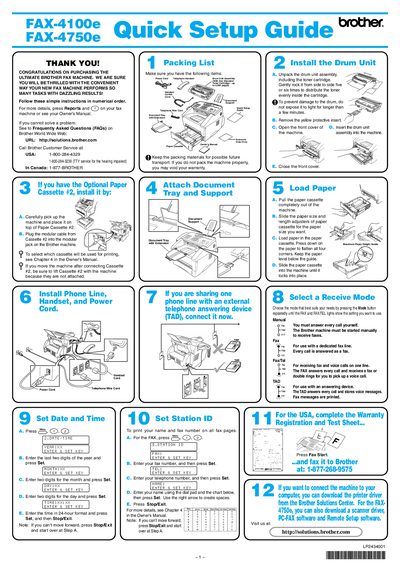
This document provides a quick setup guide for the Brother FAX-4100E/4750E fax machine. It includes instructions for unpacking the drum unit assembly, installing the machine, connecting the power and telephone cords, and loading paper into the cassette.
The guide also covers how to select the operating mode (Manual, Fax, Fax/Tel, or TAD) and how to set the date and time on the machine. Finally, it explains how to register the user's name and fax number for automatic transmission.
You must gently rock the drum unit from side to side five or six times to distribute the toner evenly, and you should not expose it to light for longer than a few minutes.
You must consult Chapter 4 in the Owner's Manual to determine how to select the specific cassette.
You must press down on the paper to flatten all four corners and keep the paper level below the guide before sliding the cassette into the machine.