
Philips mobile phone user guide, introduces the basic functions and features of the phone such as key operation, shortcut menu, icons and symbols, directory, etc.
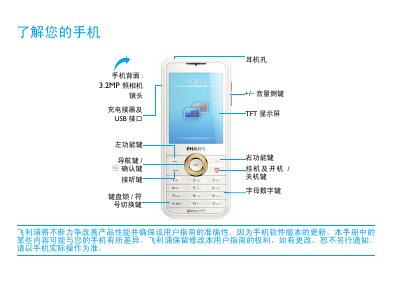
This manual provides step‑by‑step instructions for first‑time use of the Philips Xenium 9@9 series phone, including SIM card insertion, battery charging, and accessory connection. It also explains the phone’s icons, menus, and customizable settings such as shortcuts, scenario modes, and Bluetooth pairing.
Additional sections cover basic phone functions (calling, messaging, contacts), multimedia features (camera, music, video), connectivity options (USB, Bluetooth, Wi‑Fi), and extensive safety warnings, battery‑care tips, and troubleshooting advice. This manual is written in Chinese.
| Display | TFT |
|---|---|
| Camera | 3.2 MP |
| Network bands | GSM 900/1800/1900 MHz |
| SAR (Specific Absorption Rate) | 0.475 W/kg |
Turn off the phone, remove the battery cover, then follow the illustrated steps to place the SIM card into its slot before reinstalling the battery and cover.
Yes, the phone can be used while charging, but you should disconnect the charger once the battery is fully charged to avoid damage.
Bluetooth can be turned on from the settings menu; once enabled, the status icon will show that Bluetooth is active and any paired headset will be connected.
Remove and re‑install the battery, then charge it until the battery indicator stops flashing before attempting to power the phone again.