
Key facts
- Brand
- Philips
- Model
- LX8500W
- Industry
- Electronics
- Documents
- 2
- Languages
- EN · ZH
- Last added
- 2012-03-16
Start here
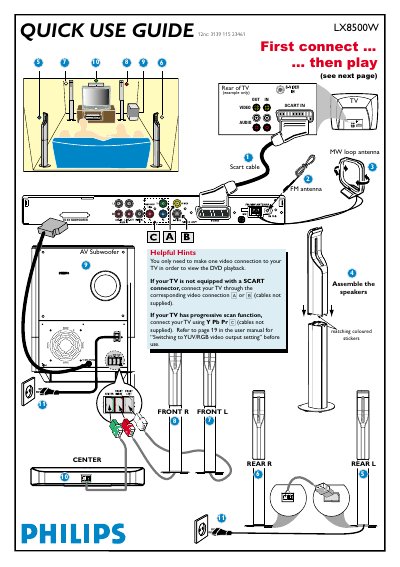
Philips LX8500W DVD Player Quick Use Guide
The guide explains the basic video connection options for the DVD player, speaker installation, and how to start playback. It also provides troubleshooting tips for common issues such as no picture or no sound.
All instructions are presented in multiple languages, but the core steps are the same: connect the video cable, power on the TV and DVD player, load a disc, and use the remote to control playback and sound settings.
Philips LX8500W specifications
| Audio resolution | 24 bit / 96 kHz |
|---|---|
| Frequency response | 30‑48 kHz |
| Power supply | 110‑240 V, 50/60 Hz |
| Dimensions (W×H×D) | 435 × 76 × 70 mm |
Source: Philips LX8500W DVD/SA-CD Home Theatre System User Manual
All Philips LX8500W documents by type
Day-to-day operation, settings and troubleshooting. Start here if the product is already set up.
The shortest path to a working setup, usually only a few pages.
Questions answered in these manuals
How do I start playback on the Philips LX8500W DVD player?
Press SOURCE on the remote until “DISC” appears, turn on the TV, select the correct video input, load a disc, and playback will start automatically.
What audio formats does the Philips LX8500W support?
It supports SA‑CD, CD, MP3‑CD, CD‑R and CD‑RW formats.
From: Philips LX8500W DVD/SA-CD Home Theatre System User Manual
What are the power requirements for the LX8500W?
The unit operates on 110‑240 V AC at 50/60 Hz.
From: Philips LX8500W DVD/SA-CD Home Theatre System User Manual