
This is the user manual for PHILIPS LX8500W, includes connection to TV, assemble speakers and play disc steps.
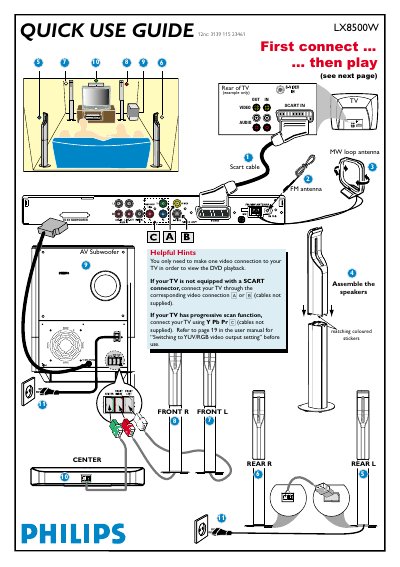
The guide explains the basic video connection options for the DVD player, speaker installation, and how to start playback. It also provides troubleshooting tips for common issues such as no picture or no sound.
All instructions are presented in multiple languages, but the core steps are the same: connect the video cable, power on the TV and DVD player, load a disc, and use the remote to control playback and sound settings.
| Video connection options | SCART, A/B, YPbPr |
|---|
Press SOURCE on the remote until “DISC” appears, turn on the TV, select the correct video input, load a disc, and playback will start automatically.