
Key facts
Start here
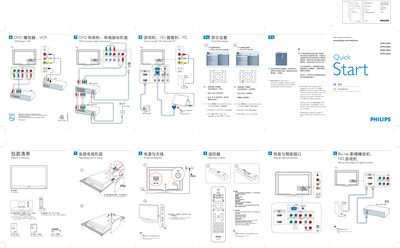
Philips 32PFL3403/37PFL3403/42PFL3403/47PFL3403 TV Quick Start Guide
This guide provides step‑by‑step instructions for first‑time setup of Philips 32‑47PFL3403 TV models. It explains how to connect the AC power cord, mount the TV stand, attach antennas or cable, and use the remote control to navigate menus, select inputs, and adjust settings.
The document also describes the Auto Store feature for scanning and storing broadcast channels, safety notes such as setting a PC monitor to 60 Hz before connection, and details the rear and side connectors (HDMI, audio, video).
Philips 42PFL3403 specifications
| Diagonal screen size | 42 inch / 107 cm |
|---|---|
| Panel resolution | 1366 x 768p |
| Brightness | 500 cd/m² |
| Dynamic screen contrast | 24000:1 |
| Response time (typical) | 8 ms |
| Viewing angle | 178º (H) / 178º (V) |
| Output power (RMS) | 2 x 10 W |
| Mains power | 100-240V, 50/60Hz |
| Power consumption | 220 W |
| Wall mount compatible | 400 x 200 mm |
Source: Philips 42PFL3403/98 42-Inch HD Ready LCD TV Product Leaflet
All Philips 42PFL3403 documents by type
Day-to-day operation, settings and troubleshooting. Start here if the product is already set up.
- PHILIPS 52PFL7803 42PFL7803 42PFL7603 52PFL7403 42PFL7403 52PFL5403 47PFL5403 42PFL5403 32PFL5403 42PFL5203 32PFL5203 42PFL3403 32PFL3403 user manual 46 p
- Philips 32PFL3403 37PFL3403 42PFL3403 47PFL3403 32HFL3330 37HFL3330 TV User Manual 55 p
- Philips 42PFL3403 TV Guide 3 p
- Philips 32PFL3403/37PFL3403/42PFL3403/47PFL3403 LCD TV User Manual 28 p
- Philips 32PFL3403/37PFL3403/42PFL3403/47PFL3403 TV User Manual 29 p
- PHILIPS 42PFL3403 user manual
The shortest path to a working setup, usually only a few pages.
Questions answered in these manuals
How do I turn the TV on for the first time?
Connect the AC power cord and press the POWER button on the remote.
From: Philips 32PFL3403/37PFL3403/42PFL3403/47PFL3403 TV Quick Start Guide
How can I set the TV's language?
Press MENU on the remote, choose Install > Language, select your language, and confirm with OK.
From: Philips 32PFL3403/37PFL3403/42PFL3403/47PFL3403 TV Quick Start Guide
How can I register my Philips TV?
Visit www.philips.com/welcome and follow the registration instructions.
Which buttons adjust the volume?
Use the VOLUME +/- buttons on the remote control.
What is the screen resolution of the Philips 42PFL3403/98?
It has a 1366 x 768p panel resolution on a 42-inch (107 cm) LCD display.
From: Philips 42PFL3403/98 42-Inch HD Ready LCD TV Product Leaflet
How many HDMI inputs does the TV have?
It has two HDMI inputs.
From: Philips 42PFL3403/98 42-Inch HD Ready LCD TV Product Leaflet