
Key facts
- Brand
- Philips
- Model
- DCP851 DCP951 DCP852
- Category
- Video Player
- Industry
- Electronics
- Documents
- 4
- Languages
- EN
- Last added
- 2026-11-18
Start here
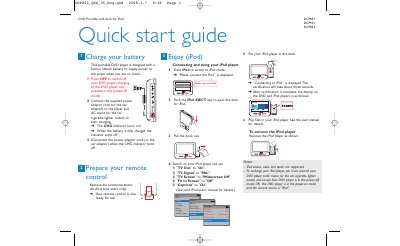
DCP851 DCP951 DCP852 Portable DVD Player Quick Start Guide
This guide explains how to power the portable DVD player using the supplied AC adapter or a car cigarette‑lighter adaptor, how to monitor charging with the CHG indicator, and how to operate basic playback functions. It also describes how to prepare the remote control and remove the protective plastic tab for first‑time use.
Additional sections cover connecting an iPod (classic, nano, or touch) in the dock, using headphones, inserting an SD/MMC card for media playback, and linking the player to a TV via AV OUT. Instructions for disc loading, playback control, and battery‑life maintenance are also included.
Philips DCP851 DCP951 DCP852 specifications
| Battery Life | Approximately 2.5 hours with headphones connected |
|---|---|
| Supported Formats | DVD-Video, VCD, CD, CD-R, CD-RW, DVD±R, DVD±RW |
| Laser Class | Class 1 laser device |
Source: Philips DCP851/DCP951/DCP852 DVD Portable with iPod Dock User Manual
All Philips DCP851 DCP951 DCP852 documents by type
Day-to-day operation, settings and troubleshooting. Start here if the product is already set up.
The shortest path to a working setup, usually only a few pages.
Questions answered in these manuals
How long does the battery last?
A fully charged battery lasts approximately 2.5 hours with headphones connected.
From: Philips DCP851/DCP951/DCP852 DVD Portable with iPod Dock User Manual
What formats can this player play?
It supports DVD-Video, VCD, CD, CD-R, CD-RW, DVD±R, and DVD±RW formats.
From: Philips DCP851/DCP951/DCP852 DVD Portable with iPod Dock User Manual
What is the warranty period for the Philips DCP851, DCP951 and DCP852?
Philips provides a one-year limited warranty to the original purchaser.
From: Philips DCP851 DCP951 DCP852 Docking Entertainment System DVD Portable User Manual
How do I reset the player if it hangs?
Press RESET on the left side of the player.
From: Philips DCP851 DCP951 DCP852 Docking Entertainment System DVD Portable User Manual
How do I charge the portable DVD player?
Connect the supplied power adaptor cord (or the car adaptor) to AC mains or the car cigarette‑lighter outlet; the CHG indicator turns red while charging and turns off when fully charged.
From: DCP851 DCP951 DCP852 Portable DVD Player Quick Start Guide