
Key facts
- Brand
- Panasonic
- Model
- SC-BT730
- Category
- Hi-Fi
- Industry
- Appliances
- Documents
- 2
- Languages
- EN
- Last added
- 2012-08-03
Start here
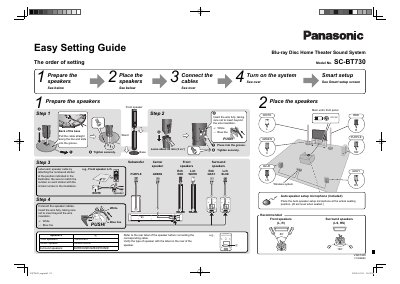
Panasonic SC-BT730 Blu-ray Disc Home Theater Sound System Easy Setting Guide
This document is an easy setting guide for the Panasonic SC-BT730 Blu-ray Disc Home Theater Sound System. It outlines the initial setup process, starting with preparing and placing the speakers in their correct positions relative to the main unit.
The guide details how to connect speaker cables using color coding or numbered stickers, specifically identifying connections for front, center, surround, and subwoofer speakers. It also covers connecting external devices like TVs via HDMI or optical audio, setting up a wireless system with an included microphone, and initiating the Smart Setup feature.
All Panasonic SC-BT730 documents by type
Day-to-day operation, settings and troubleshooting. Start here if the product is already set up.
The shortest path to a working setup, usually only a few pages.
Questions answered in these manuals
What length of wire should be left when inserting the speaker cable?
You should leave about 80 mm (3 82") of wire.
From: Panasonic SC-BT730 Blu-ray Disc Home Theater Sound System Easy Setting Guide
Where should the Auto speaker setup microphone be placed?
Place the microphone at the actual seating position at ear level when seated.
From: Panasonic SC-BT730 Blu-ray Disc Home Theater Sound System Easy Setting Guide
What is the product and what is it intended for?
This document provides operating instructions for a Blu-ray Disc Home Theater Sound System.
How should this apparatus be cleaned?
You must clean the unit only with a dry cloth.