
Key facts
- Brand
- Panasonic
- Model
- BB-HCM581
- Category
- Camcorders
- Industry
- Electronics
- Documents
- 3
- Languages
- ZH
- Last added
- 2012-03-12
Start here
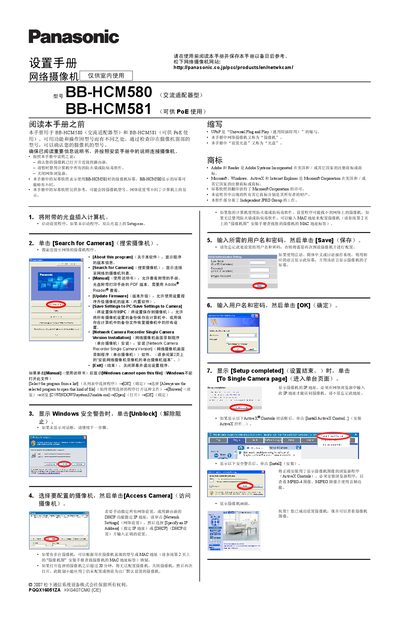
Panasonic BB-HCM580 BB-HCM581 Network Camera Setup Manual
This manual provides step‑by‑step instructions for installing and configuring Panasonic BB‑HCM580 and BB‑HCM581 network cameras. It explains how to connect the cameras to a router, disable firewalls, and use the supplied setup software to discover and configure the devices.
The guide also covers advanced features such as setting the date and time, configuring IP settings (static or DHCP), enabling UPnP, and registering the camera with Viewnetcam.com for remote internet access. Firmware updates, saving settings, and troubleshooting tips are included. This manual is written in Chinese.
Panasonic BB-HCM581 specifications
| DC Input Voltage | 10.5‑13 V DC |
|---|---|
| Maximum DC Load | 100 mA |
| Power Options | AC adapter (BB‑HCM580) or PoE (BB‑HCM581) |
| External I/O Ports | 6 terminals (GND, sensor inputs, control output, DC output) |
Source: Panasonic BB-HCM580 and BB-HCM581 Network Camcorder Installation Guide
All Panasonic BB-HCM581 documents by type
Day-to-day operation, settings and troubleshooting. Start here if the product is already set up.
Mounting, wiring and first power-up. Read it before the hardware goes in.
Questions answered in these manuals
How do I set a static IP address for the camera?
Open the setup program, click the Network Settings tab, and choose "Specify IP Address" to enter the desired IP.
From: Panasonic BB-HCM580 BB-HCM581 Network Camera Setup Manual
How can I enable remote internet access for the camera?
Enable Auto Port Forwarding (IPv4) and register the camera with Viewnetcam.com, then save the settings.
From: Panasonic BB-HCM580 BB-HCM581 Network Camera Setup Manual
How do I power the BB‑HCM580?
Connect the supplied Panasonic AC adapter and AC power cord to the DC IN jack of the BB‑HCM580.
From: Panasonic BB-HCM580 and BB-HCM581 Network Camcorder Installation Guide
Can I use PoE with the BB‑HCM581?
Yes, connect the BB‑HCM581 to a PoE hub using a standard Ethernet cable; the hub must be linked to the router.
From: Panasonic BB-HCM580 and BB-HCM581 Network Camcorder Installation Guide