
Key facts
Start here
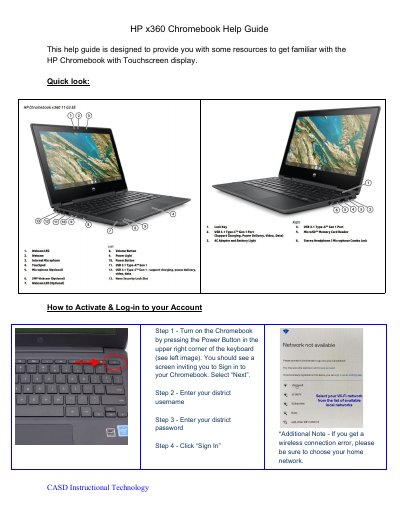
HP x360 Chromebook Help Guide
This four-page HP x360 Chromebook help guide was prepared as a quick reference for getting started with the HP Chromebook with Touchscreen display. It walks through the first steps: turning the computer on with the Power Button in the upper right corner of the keyboard, signing in with a district username and password, and connecting to a Wi-Fi network through the Quick Settings Panel.
The guide also lists Chromebook resources, including a Google "How to Chromebook" tutorial page and a Chrome OS video with timestamps for topics such as power up, Google Account, ports, settings, keyboard shortcuts, trackpad, tablet UI, Android and Linux apps, and Powerwash. The final page is a specifications section headed "Specifications:" with no values filled in; the pages carry the footer "CASD Instructional Technology".
HP x360 specifications
| Processor | 4th Generation Intel processors (Core i7-4510U, Core i5-4210U, Core i3-4030U) |
|---|---|
| Display | 15.6-in [39.6-cm] (1920×1080), high-definition (FHD), light emitting diode (LED) |
| Memory | Support for 8192-MB of DDR3L-1600-MHz system ram |
| Operating Temperature | 5°C to 35°C (41°F to 95°F) |
| Input Power | 19.5 V dc @ 3.33 A – 65 W |
| Hard Drive Interface | SATA |
Source: HP ENVY x360 Convertible PC Maintenance and Service Guide
All HP x360 documents by type
Disassembly, diagnostics and part numbers, for repair.
Ratings, dimensions and ordering codes, for selection and design work.
Day-to-day operation, settings and troubleshooting. Start here if the product is already set up.
Questions answered in these manuals
Who is this manual intended for?
This document is intended for HP authorized service providers only.
From: HP ENVY x360 Convertible PC Maintenance and Service Guide
What tools are required for removal and replacement procedures?
The manual lists specific tools required in the preliminary requirements section, though it does not list them explicitly in the provided text.
From: HP ENVY x360 Convertible PC Maintenance and Service Guide
What operating systems are supported?
The device supports Windows 10 Pro 64, Windows 10 Home 64, and Free DOS.
What is the maximum memory capacity?
The notebook supports a maximum of 32 GB DDR4-3200 SDRAM.
How do I turn on the HP x360 Chromebook?
Press the Power Button in the upper right corner of the keyboard, then select "Next" on the sign-in screen.
How do I sign in to my school account on the Chromebook?
Enter your district username, then your district password, and click "Sign In".