
Key facts
Start here
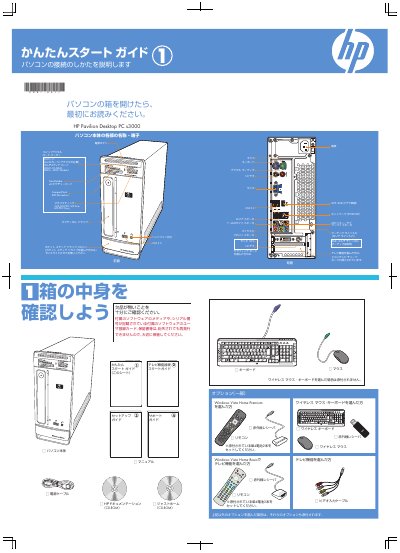
HP Pavilion Desktop PC s3000 Quick Start Guide
This is the simple start guide for the HP Pavilion Desktop PC s3000. It explains what to check after opening the box and how to connect the computer.
It covers connecting wired or wireless mice and keyboards, the power cable, LAN and monitor cables, and turning on the power. Options noted include Windows Vista Home Premium, Windows Vista Home Basic, the TV function, and the infrared receiver. This manual is written in Japanese.
HP s3000 specifications
| Physical state | Solid |
|---|---|
| Boiling point | 188 °C |
| Density | 0.822 g/mL |
| VOC content | 655 g/L |
Source: HP ElectroInk Green 072 for series 3000-5000 Chemical Safety Data Sheet
All HP s3000 documents by type
The shortest path to a working setup, usually only a few pages.
Questions answered in these manuals
What should you do if the power outlet has no ground terminal?
Consult a nearby electronics store.
What should I check after opening the box?
Check that no items are missing.
What personal protective equipment is recommended when handling this ink?
Use appropriate personal protective equipment, including gloves, eye protection, and protective clothing to minimise skin and eye contact.
From: HP ElectroInk Green 072 for series 3000-5000 Chemical Safety Data Sheet
Is HP ElectroInk Green 072 classified as a hazardous material for transport?
No, the product is not classified as a dangerous good under DOT, IATA, ADR, IMDG, or RID regulations.
From: HP ElectroInk Green 072 for series 3000-5000 Chemical Safety Data Sheet