
This document is the instruction manual of Brother fax machine, which details the functions and usage of the fax machine
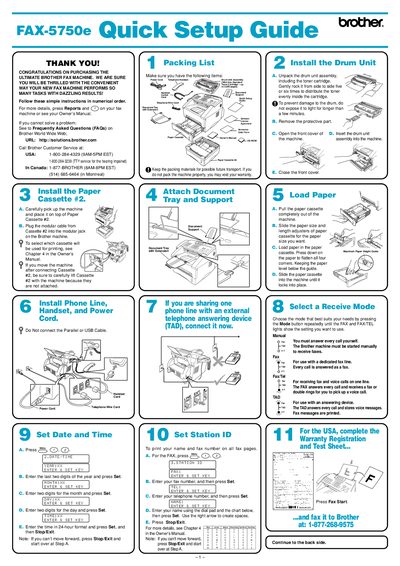
This guide walks you through unpacking the FAX-5750E, installing the drum unit, loading paper cassettes, and connecting the fax to a computer via parallel, USB, or network cables. It also explains how to install the Brother drivers and optional software from the supplied CD‑ROM.
For networked installations, the guide details configuring the fax’s IP address, subnet mask, and gateway using the control panel, as well as the default password (access) for the print server and the use of BRAdmin Professional tools.
| Parallel cable requirement | Shielded IEEE 1284‑compliant cable |
|---|---|
| USB cable length limit | Maximum 6 feet (1.8 m) |
| Default network password | access |
Press the 4 key on the control panel, select 1 to change the IP address, enter the address, press Set, then press Stop/Exit.
The default password is “access”.
Use a shielded parallel interface cable that complies with IEEE 1284.