
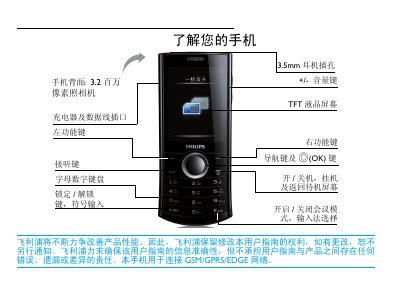
This document introduces the features and characteristics of Philips mobile phones, including how to operate the phone, the function icons in the main menu, and the use of navigation keys and shortcut menus. The phone supports GSM/GPRS/EDGE networks and has a 3.2-megapixel camera and a 3.5mm headphone jack.
This manual provides step‑by‑step instructions for using the Philips X503 mobile phone, covering basic operations such as power on/off, dialing, messaging, and camera use. It also details menu navigation, shortcut keys, and safety precautions.
Additional sections describe SIM card installation, dual‑SIM management, battery optimization, Bluetooth pairing, and warranty information, helping users get the most out of their device. This manual is written in Chinese.
| Camera resolution | 3.2 MP |
|---|---|
| Display type | TFT LCD |
| Headphone jack | 3.5 mm |
| SIM slots | Dual SIM |
Press and hold the power key (开/关机) to turn the phone on or off.
Remove the back cover, take out the battery, align the SIM card with the cut corner down, and push it into the slot; then re‑insert the battery and close the cover.
Enable automatic keyboard lock in Settings → Security Settings → Automatic Keyboard Lock; to unlock manually, long‑press the * key.
Go to Settings → SIM Card Settings → Mode Settings and select the dual‑SIM mode to activate both SIMs or choose one for standby.