
Key facts
Start here
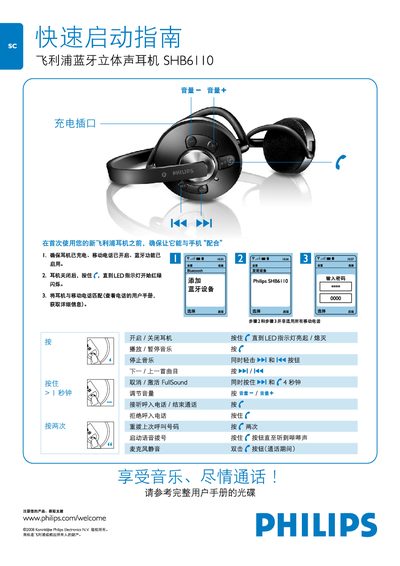
Philips SHB6110 Earphone Quick Start Guide
The guide explains how to prepare your new Philips SHB6110 earphone for first use, including pairing it with a mobile phone that has Bluetooth enabled. It covers powering the device on and off, and activating the FullSound mode.
It also details the button functions for playback control, volume adjustment, answering or ending calls, and other common operations. For more detailed instructions, refer to the full user manual on the supplied CD or the online support page. This manual is written in Chinese.
Philips SHB6110 specifications
| Playback time | up to 14 hours |
|---|---|
| Standby time | up to 300 hours |
| Charging time | 3.5 hours (standard) |
| Battery | Rechargeable Li‑polymer 360 mAh |
| Bluetooth version | 2.0+EDR, supports A2DP, AVRCP, HSP, HFP |
| FullSound | Digital sound‑enhancement feature |
| Design | OptiFit ergonomic ear‑cup design |
| Working range | up to 10 m (33 ft) |
Source: Philips SHB6110 Bluetooth Stereo Earphone User Manual
All Philips SHB6110 documents by type
Day-to-day operation, settings and troubleshooting. Start here if the product is already set up.
The shortest path to a working setup, usually only a few pages.
Questions answered in these manuals
How do I turn the earphone on?
Press and hold the f button until the LED indicator starts flashing red/green.
How do I turn the earphone off?
Press and hold the f button until the LED indicator turns off.
How long does it take to fully charge the earphones?
The standard charging time is 3.5 hours.
What do the LED flashes indicate?
Three red flashes mean less than 25 % battery, two red flashes mean less than 50 % battery, and one blue flash means more than 50 % battery remaining.