
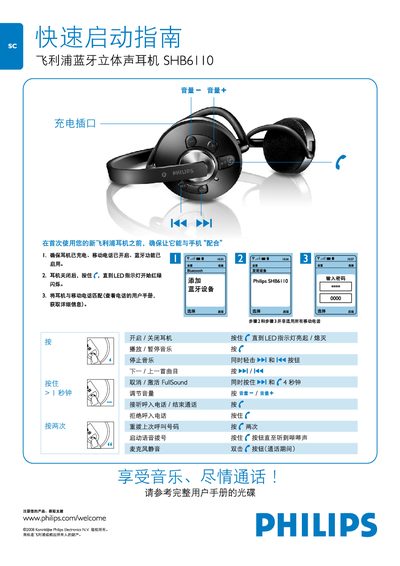
The guide explains how to prepare your new Philips SHB6110 earphone for first use, including pairing it with a mobile phone that has Bluetooth enabled. It covers powering the device on and off, and activating the FullSound mode.
It also details the button functions for playback control, volume adjustment, answering or ending calls, and other common operations. For more detailed instructions, refer to the full user manual on the supplied CD or the online support page. This manual is written in Chinese.
Press and hold the f button until the LED indicator starts flashing red/green.
Press and hold the f button until the LED indicator turns off.
Press the button marked with the person icon (人) to answer or end a call.
Press the volume‑down or volume‑up buttons (音量一 / 音量十) to change the level.
Press and hold both the f button and the w button for about 4 seconds.