
Key facts
Start here
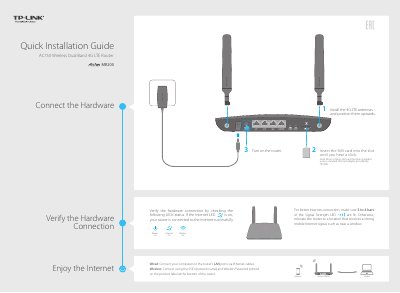
TP-Link MR200 AC750 4G LTE Router Quick Installation Guide
This document serves as a Quick Installation Guide for the TP-Link MR200 AC750 4G LTE Router. It provides instructions on connecting hardware, including 4G LTE antennas and SIM cards, and verifying the initial hardware connection via LED status indicators.
Read onlineTP-Link MR200 specifications
| Interface | 1 10/100Mbps RJ45 WAN/LAN Port; 3 10/100Mbps RJ45 LAN Ports; 1 SIM Card Slot |
|---|---|
| Network Type | LTE/DC- HSPA+/HSPA+/HSPA/UMTS/EDGE/GRPS/GSM |
| Data Rates | Cat 4 FDD DL: 150Mbps, UL: 50Mbps; TDD DL: 112Mbps, UL: 32Mbps |
| Wireless Standards | IEEE 802.11ac/n/a 5GHz; IEEE 802.11n/g/b 2.4GHz |
| Wireless Speeds | 5GHz: Up to 433Mbps; 2.4GHz: Up to 300Mbps |
| Antenna Type | WiFi antenna: 3 internal antennas; LTE antenna: 2 detachable external antennas |
| Wireless Security | 64/128-bit WEP, WPA/WPA2, WPA-PSK/WPA2-PSK encryption |
| VPN | Up to 10 IPSec VPN tunnels simultaneously |
Source: TP-LINK Archer MR200 AC750 Wireless Dual Band 4G LTE Router User Guide
All TP-Link MR200 documents by type
The shortest path to a working setup, usually only a few pages.
Day-to-day operation, settings and troubleshooting. Start here if the product is already set up.
Questions answered in these manuals
What can I do if the login page does not appear?
Verify that the computer is set to obtain an IP address automatically, ensure the URL is correct, try another browser, reboot the router, or disable and enable the network adapter.
From: TP-Link MR200 AC750 4G LTE Router Quick Installation Guide
What can I do if I cannot access the Internet?
Check the SIM card type and service area, verify credit, check LAN connection, verify ISP parameters (APN, Username, Password), check PIN settings, check Data Limit, and ensure Mobile Data and Data Roaming are enabled.
From: TP-Link MR200 AC750 4G LTE Router Quick Installation Guide
What network types does the Archer MR200 support?
It supports 4G, 3G and 2G networks, including LTE, DC-HSPA+/HSPA+/HSPA/UMTS and EDGE/GPRS/GSM.
From: TP-LINK Archer MR200 AC750 Wireless Dual Band 4G LTE Router User Guide
What are the maximum wireless speeds?
The router provides up to 300Mbps on the 2.4GHz band and up to 433Mbps on the 5GHz band.
From: TP-LINK Archer MR200 AC750 Wireless Dual Band 4G LTE Router User Guide