
this is a configuration guide for tplink wireless router
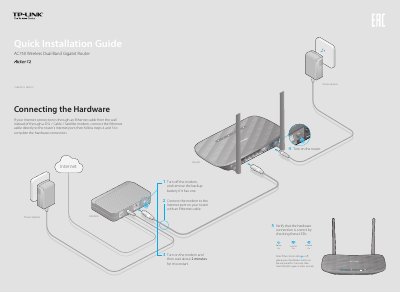
This document serves as a Quick Installation Guide for the TP-Link AC750 Wireless Dual Band Gigabit Router. It provides step-by-step instructions for connecting the hardware, including the modem and power adapter, and verifying the status of the router's LEDs. The guide also details how to power on the device and check the wireless indicators.
| Product Name | AC750 Wireless Dual Band Gigabit Router |
|---|---|
| Power Input | 12V 1.5A |
| FCC ID | TE7C2 |
| Default Username | admin |
| Default Password | admin |
Change the computer setting to obtain an IP address automatically, verify the URL http://tplinkwifi.net, try another browser, reboot the router, or disable and re-enable the network adapter.
Press and hold the WPS/Reset button on the back until the Power LED starts blinking, or log in to the Web Management page and select System Tools > Factory Defaults.
Reset the router to factory defaults and then log in using 'admin' for both the username and password.
Check the product label for the default password or log in to the Web Management page to obtain or reset the wireless password.