
Key facts
Start here
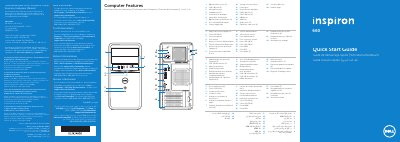
Dell Inspiron 660 D11M Quick Start Guide
This document serves as a regulatory compliance and quick start guide for the Dell Inspiron 660 computer, specifically model D11M. It provides essential information regarding NOM (Norma Oficial Mexicana) requirements, including importer details, voltage specifications, and frequency ratings. The guide lists key computer features and port locations, such as USB 2.0 and 3.0 ports, HDMI, VGA, and expansion slots.
Read onlineDell D11M specifications
| Regulatory Model Number | D11M |
|---|---|
| Input Voltage | 115/230 V AC |
| Input Frequency | 50 to 60 Hz |
| Input Current | 7.0 A/4.0 A or 6.0 A/2.1 A |
| USB 2.0 Ports | 2 |
| USB 3.0 Ports | 4 |
| Optical Drive Covers | 2 |
All Dell D11M documents by type
The shortest path to a working setup, usually only a few pages.
Disassembly, diagnostics and part numbers, for repair.
Questions answered in these manuals
Where can I find detailed features and advanced options for my computer?
You can find this information by clicking Start→ All Programs→ Dell Help Documentation or visiting support.dell.com/manuals.
What is the contact number for Dell customers in the United States?
Customers in the United States can call 800-WWW-DELL (800-999-3355).
What tools are required for internal repairs?
The procedures require a small minus screwdriver, a Phillips screwdriver, and a small plastic prying tool.
From: Dell Vostro Mini Tower 260/260s Official Model D11M Official Type D11M001 User Manual
How do I ground myself before working inside the computer?
Touch an unpainted metal surface, such as the metal on the back of the computer, to discharge static electricity.
From: Dell Vostro Mini Tower 260/260s Official Model D11M Official Type D11M001 User Manual
What tools are recommended for opening the computer?
The recommended tools are a small minus screwdriver, a Phillips screwdriver, and a small plastic pry tool.
From: Dell Vostro Mini Tower 260/260s Official Model D11M Official Type D11M001 User Manual
How should you handle static electricity before working inside the computer?
You should touch an unpainted metal surface, such as the metal on the back of the computer, to discharge static electricity.
From: Dell Vostro Mini Tower 260/260s Official Model D11M Official Type D11M001 User Manual