
Key facts
Start here
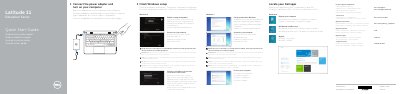
Dell Latitude 11 Education Series Quick Start Guide
This guide provides step-by-step instructions for setting up the Dell Latitude 11 Education Series laptop, including connecting the power adapter, completing Windows setup, enabling security updates, connecting to a network, signing in with a Microsoft account, and locating Dell applications. It also covers registering the computer, using Dell Backup and Recovery, and accessing product support and manuals.
The document includes a detailed features diagram labeling 21 components such as microphones, camera, speakers, USB ports, HDMI, RJ45, status lights, touchpad, and drain holes. Regulatory information lists the regulatory model P21T, regulatory type P21T001, and computer model Latitude 11-3150. Additional notes reference the Owner's Manual at dell.com/support/manuals for further details.
Dell Latitude 11 Education Series specifications
| Computer model | Latitude 11-3150 |
|---|---|
| Regulatory model | P21T |
| Regulatory type | P21T001 |
| Camera | Integrated camera with status light |
All Dell Latitude 11 Education Series documents by type
The shortest path to a working setup, usually only a few pages.
Questions answered in these manuals
How do I connect to a secured wireless network?
Enter the password for the wireless network access when prompted.
Where can I find the Owner's Manual for more information?
See the Owner’s Manual at dell.com/support/manuals.
Where can I find the Owner's Manual?
The guide directs users to dell.com/support/manuals for the Owner's Manual.
What computer model is listed in this guide?
The guide lists the computer model as Latitude 11-3150.
What should I do if I am connecting to a secured wireless network?
Enter the password for the wireless network access when prompted.
Where can I find more information and manuals?
Visit dell.com/support/manuals for the Owner's Manual and other support resources.