
Key facts
Start here
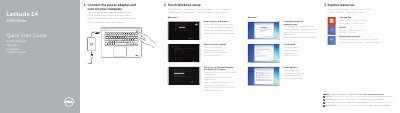
Dell Latitude 14 3000 Series Laptop Quick Start Guide
This Dell Latitude 14 3000 Series Quick Start Guide provides setup instructions in English, Danish, Finnish, Norwegian, and Swedish. It covers connecting the power adapter, turning on the computer, finishing Windows setup for Windows 8 or Windows 7, enabling security and updates, connecting to a network, and signing in to a Microsoft account or creating a local account.
The guide lists product features including microphones, camera, power button, VGA, network, HDMI, USB, headset, touchpad, Finger print reader, speakers, status lights, memory-card reader, power connector, security-cable slot, and service-tag label. It also provides links to Dell product support, manuals, contact information, and regulatory compliance pages.
Dell Latitude 14-3450 specifications
| USB 3.0 connectors | 2 |
|---|---|
| USB 2.0 connector | 1 |
| Finger print reader | optional |
| Computer model | Latitude 14-3450 |
Source: Dell Latitude 14 3000 Series Laptop Quick Start Guide
All Dell Latitude 14-3450 documents by type
The shortest path to a working setup, usually only a few pages.
Questions answered in these manuals
How do I start the Dell Latitude 14 3000 Series?
Connect the power adapter and turn on your computer.
Where can I find the Owner’s Manual?
See the Owner’s Manual at dell.com/support/manuals.
How do I turn on the computer?
Connect the power adapter and turn on your computer.
From: Dell Latitude 14 3000 Series Notebook Quick Start Guide
Where is the Owner's Manual available?
The Owner's Manual is available at dell.com/support/manuals.
From: Dell Latitude 14 3000 Series Notebook Quick Start Guide
How do I turn on the computer?
Connect the power adapter and turn on the computer.
Where can I find the Owner's Manual?
See the Owner's Manual at dell.com/support/manuals.