
Key facts
Start here
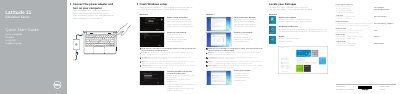
Dell Latitude 11-3150 Education Series Computer Quick Start Guide
The Dell Latitude 11-3150 Education Series Quick Start Guide explains initial setup for the computer. It shows how to connect the power adapter and turn on the computer, finish Windows setup, enable security and updates, connect to a network, sign in to a Microsoft account or create a local account, set a Windows password, and protect the computer.
The guide also covers locating Dell apps, using Windows Help and Tips, and finding product support and manuals at dell.com/support/manuals. A numbered features section identifies parts such as microphones, camera, speakers, security-cable slot, power button, USB and HDMI connectors, SD-card reader, audio connector, status lights, service-tag label, drain holes, touchpad, RJ45 connector, and power connector.
Dell Latitude 11 Education Series (Latitude 11-3150) specifications
| Computer model | Latitude 11-3150 |
|---|---|
| Regulatory model | P21T |
| Regulatory type | P21T001 |
| USB 2.0 connector | Included (feature 7) |
| USB 3.0 connector | Included (feature 17) |
| HDMI connector | Included (feature 18) |
| RJ45 connector | Included (feature 19) |
| SD-card reader | Included (feature 8) |
Source: Dell Latitude 11-3150 Education Series Computer Quick Start Guide
All Dell Latitude 11 Education Series (Latitude 11-3150) documents by type
The shortest path to a working setup, usually only a few pages.
Questions answered in these manuals
How do I turn on the computer?
Connect the power adapter and turn on your computer.
From: Dell Latitude 11-3150 Education Series Computer Quick Start Guide
What should I do when connecting to a secured wireless network?
Enter the password for the wireless network access when prompted.
From: Dell Latitude 11-3150 Education Series Computer Quick Start Guide
Where can I find more information about this computer?
See the Owner's Manual at dell.com/support/manuals.
From: Dell Latitude 11 Education Series (Latitude 11-3150) Quick Start Guide
What should I do when connecting to a secured wireless network?
Enter the password for the wireless network access when prompted.
From: Dell Latitude 11 Education Series (Latitude 11-3150) Quick Start Guide