
Key facts
Start here
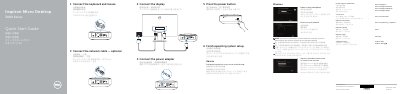
Dell Inspiron 3050 Micro Desktop 3000 Series Quick Start Guide
This is the Dell Quick Start Guide for the Inspiron Micro Desktop 3000 Series, computer model Inspiron 3050 (regulatory model D12U, regulatory type D12U001). The first page walks through the basic setup in numbered steps: connecting the keyboard and mouse, connecting the network cable (optional), connecting the power adapter, pressing the power button, connecting the display, and finishing operating system setup.
The second page lists the computer's features with numbered callouts, from the hard-drive activity light and power button to the DisplayPort, HDMI-out port, USB ports, media-card reader and security-cable slot. It also points to Dell apps in Windows such as SupportAssist and Dell Backup and Recovery, and gives Dell support, contact and regulatory web addresses. Instructions are printed in English, Chinese, Japanese and Korean.
Dell Inspiron 3050 specifications
| Computer model | Inspiron 3050 |
|---|---|
| Regulatory model | D12U |
| Regulatory type | D12U001 |
| USB 2.0 ports | 2 |
| DisplayPort and HDMI-out port | Both provided |
| USB 3.0 port and USB 2.0 port | One each |
| Other ports and slots | Network port, headset port, media-card reader, security-cable slot |
Source: Dell Inspiron 3050 Micro Desktop 3000 Series Quick Start Guide
All Dell Inspiron 3050 documents by type
The shortest path to a working setup, usually only a few pages.
Questions answered in these manuals
What should I do to finish operating system setup?
Follow the instructions shown on the screen to complete setup in Windows.
From: Dell Inspiron 3050 Micro Desktop 3000 Series Quick Start Guide
What is needed when connecting to a secured wireless network?
Enter the password for the wireless network access when prompted.
From: Dell Inspiron 3050 Micro Desktop 3000 Series Quick Start Guide
How do I connect the keyboard and mouse?
Connect the keyboard and mouse.
Which operating system is included?
The computer includes Ubuntu.
How do I connect the keyboard and mouse?
Connect the keyboard and mouse.
How do I finish operating system setup?
Follow the instructions on the screen to finish setup.