
Key facts
Start here
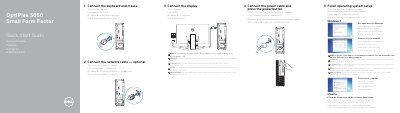
Dell OptiPlex 3050 Small Form Factor Quick Start Guide
This guide helps you set up your Dell OptiPlex 3050 Small Form Factor computer. Connect peripherals like keyboard, mouse, display, and power. If using a discrete graphics card, connect the display to it. Complete OS setup by following on-screen instructions. The guide also lists ports and features for reference.
The back of the guide includes product support links, regulatory information, and a diagram of the computer’s ports and connectors for easy reference.
Dell OptiPlex 3050 Small Form Factor specifications
| Rated Voltage | 100 - 240 V |
|---|---|
| Rated Frequency | 50 - 60 Hz |
| Rated Input Current | 4 A |
| Regulatory Model | D11S |
Source: Dell OptiPlex 3050 Small Form Factor Quick Start Guide
All Dell OptiPlex 3050 Small Form Factor documents by type
The shortest path to a working setup, usually only a few pages.
- Dell OptiPlex 3050 Small Form Factor Quick Start Guide 2 p
- Dell OptiPlex 3050 Small Form Factor Quick Start Guide 2 p
- Dell OptiPlex 3050 Small Form Factor Quick Start Guide 2 p
- Dell OptiPlex 3050 Small Form Factor Desktop Quick Start Guide 2 p
- Dell OptiPlex 3050 Small Form Factor Quick Start Guide 2 p
- Dell OptiPlex 3050 Small Form Factor Quick Start Guide 2 p
- Dell OptiPlex 3050 Small Form Factor Quick Start Guide 2 p
- Dell OptiPlex 3050 Small Form Factor Quick Start Guide 2 p
- Dell OptiPlex 3050 Small Form Factor Quick Start Guide 2 p
Questions answered in these manuals
If I ordered my computer with a discrete graphics card, where should I connect the display?
Connect the display to the discrete graphics card.
From: Dell OptiPlex 3050 Small Form Factor Quick Start Guide
How do I finish the operating system setup?
Follow the instructions on the screen to finish setup.
From: Dell OptiPlex 3050 Small Form Factor Quick Start Guide
Where should I connect the display if the computer has a discrete graphics card?
If the computer is ordered with a discrete graphics card, the display should be connected to that card.
From: Dell OptiPlex 3050 Small Form Factor Quick Start Guide
If the computer has a discrete graphics card, where should the display be connected?
The display should be connected to the discrete graphics card.
From: Dell OptiPlex 3050 Small Form Factor Quick Start Guide
How do I connect the display to the OptiPlex 3050 Small Form Factor?
Connect the display to the display port, unless the computer was ordered with a discrete graphics card; in that case, connect the display to the discrete graphics card.
From: Dell OptiPlex 3050 Small Form Factor Quick Start Guide
What should I do after connecting the power cable?
Press the power button.
From: Dell OptiPlex 3050 Small Form Factor Quick Start Guide