
Key facts
- Brand
- 3M
- Model
- MP8745
- Category
- Projector
- Industry
- Electronics
- Documents
- 3
- Languages
- EN
- Last added
- 2012-08-02
Start here
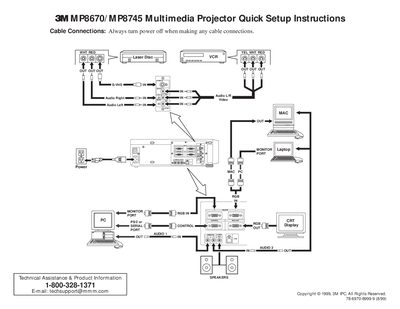
3M P8670/MP8745 Multimedia Projector Quick Setup Instructions
This document provides quick setup instructions for the 3M P8670/MP8745 Multimedia Projector. It details how to connect cables safely while the power is off and lists optional accessories such as RS-232 control and USB mouse cables.
The guide explains the functions of the projector controls, including video input selection, image magnification, picture-in-picture mode, and remote control operations like laser painting and screen blanking. It also outlines specific start-up and shutdown procedures to ensure proper operation and cooling.
3M MP8745 specifications
| Projection Lamp | UHB (ultra‑high bright) lamp |
|---|---|
| Resolution | XGA 1024 × 768 (three LCD panels) |
| Digital Magnification | 4× |
| Speakers | Two built‑in stereo speakers (1 W each) |
| Power Supply | Universal |
| Mouse Emulation | USB, Serial, PS/2 and ADB |
| Zoom/Focus | Power zoom and power focus functions |
| Picture‑in‑Picture | Supported (PinP) |
| Freeze Function | Available |
| Security Slot | Kensington™ Slot K |
All 3M MP8745 documents by type
Day-to-day operation, settings and troubleshooting. Start here if the product is already set up.
The shortest path to a working setup, usually only a few pages.
Questions answered in these manuals
What is the warranty period for this projector?
3M warrants the product against defects in material and workmanship for a period of two years from the date of purchase.
What type of lamp does this projector use?
The projector is designed to use 3M brand lamps, specifically high-pressure mercury lamps.
What safety precaution is required before making cable connections?
You must always turn the power off when making any cable connections.
From: 3M P8670/MP8745 Multimedia Projector Quick Setup Instructions
How long does the fan run after pressing the STANDBY/ON button during shutdown?
The fan rotates for about 1 minute to cool the projector.
From: 3M P8670/MP8745 Multimedia Projector Quick Setup Instructions
How do I replace the lamp in the MP8745?
Refer to Section 6.4 “Replacing the Lamp” for the step‑by‑step lamp replacement procedure.
What safety precautions should I follow before using the projector?
Read and understand all instructions, keep the projector on a flat surface, avoid looking into the lamp, and follow all listed safeguards.