
Key facts
Start here
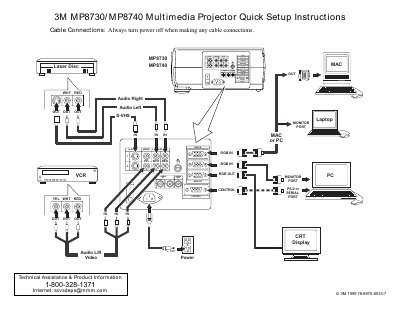
3M MP8730/MP8740 Multimedia Projector Quick Setup Instructions
This document provides quick setup instructions for the 3M MP8730 and MP8740 multimedia projectors. It details the necessary cable connections, including VGA, S-Video, and audio cables, and lists the items included in the projector packout. The guide also explains how to use the remote control transmitter for various functions such as adjusting focus, zoom, and navigating menus.
Read online3M MP8730 specifications
| Resolution | XGA resolution (3 separate 1024 x 768 LCD panels) |
|---|---|
| Brightness | Metal halide projection lamp |
| Power | Universal power supply |
| Speakers | Two built-in stereo speakers (2 watts each) |
| Warranty | Two years |
All 3M MP8730 documents by type
Day-to-day operation, settings and troubleshooting. Start here if the product is already set up.
The shortest path to a working setup, usually only a few pages.
Questions answered in these manuals
What is the warranty period for the 3M MP8730 projector?
The product is warranted against defects in material and workmanship for a period of two years from the date of purchase.
Does the projector include a laser pointer?
Yes, the projector includes a laser pointer as part of the remote control.
How do I turn on the projector?
Set the main power switch to ON, then press and hold the STANDBY/ON button until the ON indicator lights green.
From: 3M MP8730/MP8740 Multimedia Projector Quick Setup Instructions
What should I do before making cable connections?
Always turn the power off when making any cable connections.
From: 3M MP8730/MP8740 Multimedia Projector Quick Setup Instructions