
This manual is about the quick setup instructions of the 3MP8670/MP8745 multimedia projector. It includes information about the projector's various connection ports, power switches, etc., as well as connection methods.
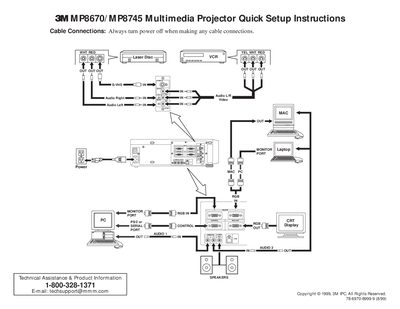
This document provides quick setup instructions for the 3M P8670/MP8745 Multimedia Projector. It details how to connect cables safely while the power is off and lists optional accessories such as RS-232 control and USB mouse cables.
The guide explains the functions of the projector controls, including video input selection, image magnification, picture-in-picture mode, and remote control operations like laser painting and screen blanking. It also outlines specific start-up and shutdown procedures to ensure proper operation and cooling.
You must always turn the power off when making any cable connections.
The fan rotates for about 1 minute to cool the projector.