
Key facts
- Brand
- 3M
- Model
- MP8780
- Category
- Projector
- Industry
- Electronics
- Documents
- 3
- Languages
- EN
- Last added
- 2012-08-02
Start here
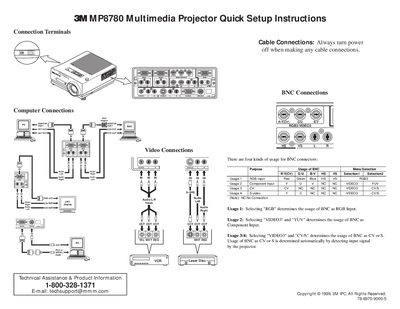
3M MP8780 Multimedia Projector Quick Setup Instructions
This document provides quick setup instructions for the 3M MP8780 Multimedia Projector. It details the various cable connections available, including BNC connectors for RGB, Component, CV, and S-video inputs, as well as VGA and audio options. The guide explains how to configure these inputs via the projector's menu selection.
Read onlineAll 3M MP8780 documents by type
Day-to-day operation, settings and troubleshooting. Start here if the product is already set up.
The shortest path to a working setup, usually only a few pages.
Questions answered in these manuals
What should be done if the projector is found to be defective?
The customer must immediately notify the dealer from which they purchased the product.
What is the intended use of the 3M MP8780 projector?
The projector is designed for indoor use with specific 3M brand lamps, ceiling mount hardware, and nominal local voltages, and it is not intended for household use.
How do I select the input source on the projector?
Press the RGB/VIDEO button on the projector or remote to select the source of the signal to be projected.
From: 3M MP8780 Multimedia Projector Quick Setup Instructions
What is the reset period after turning off the power?
There is a 90 second reset period before the STANDBY/ON button will function again.
From: 3M MP8780 Multimedia Projector Quick Setup Instructions
What is the warranty period for the projector?
The product is warranted against defects in material and workmanship for two years from the date of purchase.
What is the intended use of the 3M MP8780 projector?
The projector was designed, built, and tested for use indoors using 3M brand lamps, ceiling mount hardware, and nominal local voltages.