
Key facts
- Brand
- 3M
- Model
- MP8640
- Category
- Projector
- Industry
- Electronics
- Documents
- 3
- Languages
- EN
- Last added
- 2012-08-02
Start here
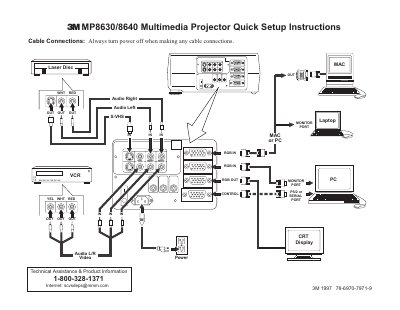
3M MP8630/8640 Multimedia Projector Quick Setup Instructions
This document provides quick setup instructions for the 3M MP8630/8640 Multimedia Projector. It includes a diagram of cable connections to input devices such as Laser Disc players, S-VHS, and PCs, along with a list of items included in the projector packout like power cords, video cables, and remote control transmitters.
Read online3M MP8640 specifications
| Brightness | 650 lumens |
|---|---|
| Resolution | SVGA 800 x 600 |
| Color Depth | 16.7 million colors |
| Speakers | Two built-in stereo speakers (2 watt) |
All 3M MP8640 documents by type
Day-to-day operation, settings and troubleshooting. Start here if the product is already set up.
The shortest path to a working setup, usually only a few pages.
Questions answered in these manuals
What is the warranty period for this projector?
3M warrants the product against defects in material and workmanship for a period of one year from the date of purchase.
Which languages are supported by the on-screen menu?
The projector features an on-screen menu with seven languages available.
What is the intended use of this projector?
The 3M Multimedia Projector was designed, built and tested for use indoors.
What is the warranty period?
The product is warranted against defects in material and workmanship for one year from the date of purchase.
What safety precaution is required before connecting cables?
You must always turn the power off when making any cable connections.
From: 3M MP8630/8640 Multimedia Projector Quick Setup Instructions
How long should you hold the STANDBY/ON button to shut down?
Press and hold the STANDBY/ON button for 3-5 seconds.
From: 3M MP8630/8640 Multimedia Projector Quick Setup Instructions