
Key facts
Start here
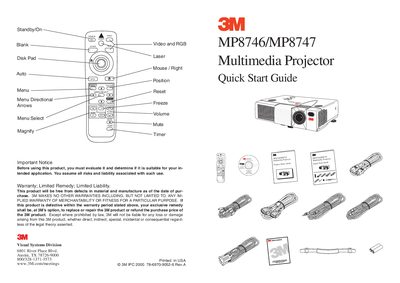
3M MP8746/MP8747 Multimedia Projector Quick Start Guide
The document serves as a quick start guide for the 3M MP8746/MP8747 Multimedia Projector. It includes important notices regarding warranty and liability, along with visual instructions on using the remote control buttons such as Standby/On, Menu Select, and Magnify.
The guide details the startup procedure, which involves waiting for a 5-second delay after pressing the power button. It also outlines connection methods for PC & Mac systems, including the use of mouse cables and video cables.
3M MP8747 specifications
| Laser Class | Class 2 |
|---|---|
| Laser Wavelength | 650 nm |
| Laser Max Output | 1 mW |
| Voltage Range | 90 to 132 volts / 198 to 264 volts |
| Frequency Range | 50 to 60 Hz |
| Cooling Time | 45 minutes |
Source: 3M MP8746/MP8747 Personal Projector Operator's Guide
All 3M MP8747 documents by type
Day-to-day operation, settings and troubleshooting. Start here if the product is already set up.
The shortest path to a working setup, usually only a few pages.
Questions answered in these manuals
What is the wavelength of the laser radiation emitted by this projector?
The wavelength of the laser radiation is 650 nm.
How long must you wait after turning off the unit before replacing the lamp?
You must wait 45 minutes to let the lamp cool down before replacing it.
What is the cooling time required before replacing the lamp?
You must wait 45 minutes to let the lamp cool before replacing it.
Can the projector be used outdoors?
No, the projector is designed for indoor use and should not be exposed to direct sunlight or used outside.
What is the required wait time after pressing the power button?
You must wait 5 seconds before proceeding with other actions.
From: 3M MP8746/MP8747 Multimedia Projector Quick Start Guide
How do you turn on the projector using the remote?
Press and hold the Standby/Power button for 3 seconds to start up.
From: 3M MP8746/MP8747 Multimedia Projector Quick Start Guide