
Key facts
Start here
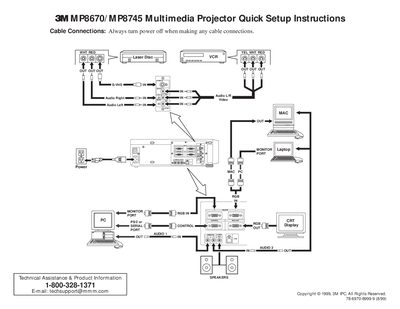
3M P8670/MP8745 Multimedia Projector Quick Setup Instructions
This document provides quick setup instructions for the 3M P8670/MP8745 Multimedia Projector. It details how to connect cables safely while the power is off and lists optional accessories such as RS-232 control and USB mouse cables.
The guide explains the functions of the projector controls, including video input selection, image magnification, picture-in-picture mode, and remote control operations like laser painting and screen blanking. It also outlines specific start-up and shutdown procedures to ensure proper operation and cooling.
All 3M P8670 documents by type
Day-to-day operation, settings and troubleshooting. Start here if the product is already set up.
The shortest path to a working setup, usually only a few pages.
Questions answered in these manuals
What is the warranty period for this projector?
3M warrants the product against defects in material and workmanship for a period of two years from the date of purchase.
What is the intended use of the 3M MP8670 projector?
The projector is designed, built, and tested for use indoors using 3M brand lamps, 3M brand ceiling mount hardware, and nominal local voltages.
What safety precaution is required before making cable connections?
You must always turn the power off when making any cable connections.
From: 3M P8670/MP8745 Multimedia Projector Quick Setup Instructions
How long does the fan run after pressing the STANDBY/ON button during shutdown?
The fan rotates for about 1 minute to cool the projector.
From: 3M P8670/MP8745 Multimedia Projector Quick Setup Instructions